

Your graphics add a nice touch to my presentations and I recently used them for one of my all-hands meetings. Your toolbox adds professionalism to my slides. Instead of using standard clipart.
Claude Jones, Director of Engineer, @Walmartlabs, USA

Your graphics add a nice touch to my presentations and I recently used them for one of my all-hands meetings. Your toolbox adds professionalism to my slides. Instead of using standard clipart.
Claude Jones, Director of Engineer, @Walmartlabs, USA
I needed a fresh look at some of my slides. I've tried to find a way to create a paintbrush effect, to underline, accentuate, add some color and the handwritten markers were just the things. Very easy to use, easy to size, change the color. It was an affordable, perfect solution and I'm happy to recommend it.
Anonymous, US
The crisp, clean look of the graphics, and the fact that it allowed me to easily edit and change the colors to match the template was my main reason for purchasing them.
Brandie Jenkins, E-learning Developer, USA
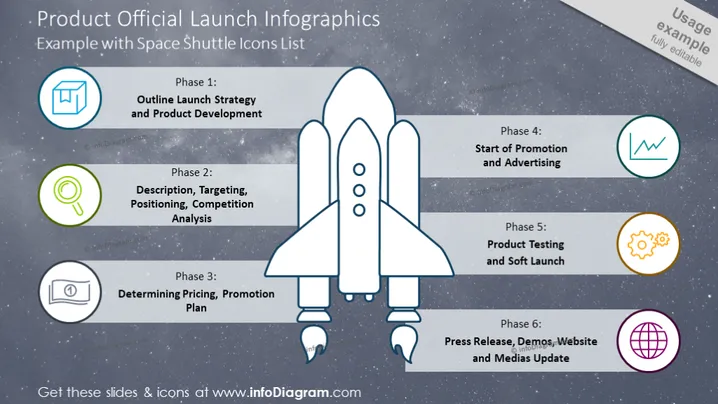
The slide outlines a structured approach for a product launch in six phases: Phase 1 addresses the initial Outline Launch Strategy and Product Development, explaining the foundational planning and creation of the product. Phase 2 covers Description, Targeting, Positioning, Competition Analysis, detailing market assessment and audience identification. Phase 3 focuses on Determining Pricing, Promotion Plan, which involves setting the price and planning marketing initiatives. Phase 4 concentrates on the Start of Promotion and Advertising, indicating when branding efforts become public. Phase 5 is for Product Testing and Soft Launch, where the product is trialed and introduced tentatively. Finally, Phase 6 pertains to the Press Release, Demos, Website, and Media Update, which describe the dissemination of information to the public and stakeholders.
The slide has a modern and dynamic appearance, with the central rocket graphic symbolizing the launch theme effectively. The use of vibrant icons on a muted background enhances readability and captures attention.



