
Reviews
Ihre Grafiken verleihen meinen Präsentationen eine nette Note, und ich habe sie kürzlich für eines meiner All-Hands-Meetings verwendet. Ihre Toolbox verleiht meinen Folien Professionalität, anstatt Standard-Clipart zu verwenden.
Ich brauchte einen neuen Blick auf einige meiner Folien. Ich habe versucht, einen Weg zu finden, einen Pinselschlag-Effekt zu erzielen, um zu unterstreichen, hervorzuheben, Farbe hinzuzufügen, und die handgeschriebenen Markierungen waren genau das Richtige. Sehr einfach zu bedienen, leicht in der Größe zu ändern, die Farbe zu ändern. Es war eine erschwingliche, perfekte Lösung und ich empfehle sie gerne weiter.
Die klare, saubere Optik der Grafiken und die Tatsache, dass ich die Farben leicht bearbeiten und an die Vorlage anpassen konnte, war mein Hauptgrund für den Kauf.
Description
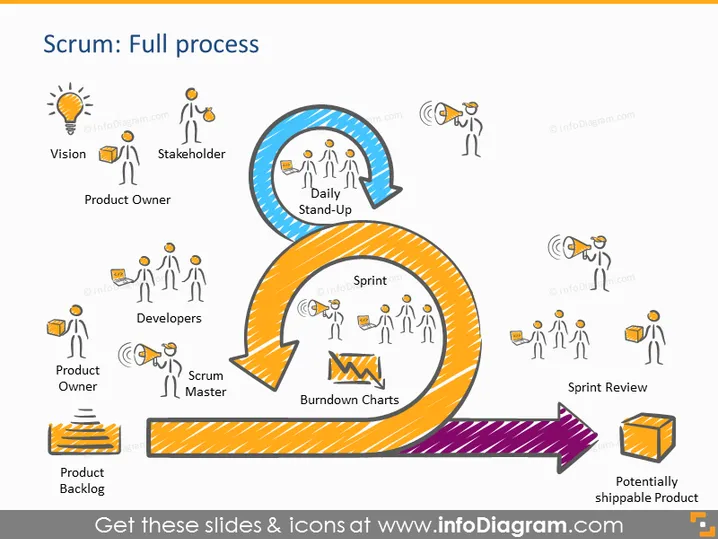
Scrum: Full process
Slide Content
This PowerPoint slide visually represents the Scrum framework, detailing its flow from conception to completion. At the start, a lightbulb icon labelled "Vision" signifies the inception of an idea. "Stakeholder" and "Product Owner" come next, depicting those responsible for the vision. The "Daily Stand-Up" is a circular arrow highlighting regular team check-ins. The "Developers," "Scrum Master," and "Burndown Charts" denote the active work phase, with the Scrum Master facilitating and Burndown Charts tracking progress. The process ends with a "Sprint Review" and a "Potentially shippable Product," suggesting a cycle ready to repeat for continuous improvement.
Graphical Look
- The slide uses a bright, color-coded scheme to differentiate various stages of the Scrum process.
- A series of eight icons, each accompanied by a brief label, are interconnected by arrows forming a loop, indicative of the Scrum process's cyclical nature.
- Icons are simple line drawings of people and objects: a lightbulb for "Vision," human figures for roles like "Stakeholder" and "Scrum Master," and charts or objects for "Burndown Charts" and "Potentially shippable Product."
- A large circular arrow in blue surrounds the "Daily Stand-Up" section, while an orange arrow guides the flow from "Sprint" to "Sprint Review."
- A purple diagonal arrow points to the final stage, labeled "Potentially shippable Product," suggesting forward movement towards a goal.
The slide has a clean and vibrant appearance, utilizing colors and shapes to guide viewers through the Scrum process. Icons are clear and effectively communicate the role or concept they represent.
Use Cases
- Introducing the Scrum methodology to teams new to Agile practices, providing a clear visual roadmap.
- Refreshing the Scrum process for existing Agile teams during workshops or training sessions, to reinforce understanding.
- Explaining project flow to stakeholders or clients unfamiliar with Scrum to set expectations about the development process.
- Reviewing and assessing the efficiency of a team's Scrum process during retrospective meetings to identify areas for improvement.
How to Edit
How to edit text & colors

How to expand / shorten diagram

How to Replace Icons in infoDiagram PPT


