
Reviews
Your slides are my 'secret sauce' when it comes to visualising my ideas to clients. I'm saving so much time.
InfoDiagram has been a wonderful resource since I found the product site a few years ago.
Your slides often generate good comments and ideas from my team that improve the final slides.
Description
Operational Expenses Analysis
Slide Content
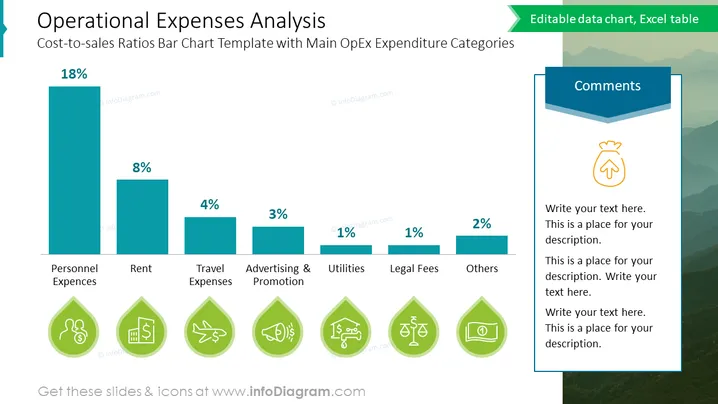
The slide titled "Operational Expenses Analysis" presents a cost-to-sales ratios bar chart template with main operational expenditure categories. The bar chart displays percentages for different expense types: Personnel Expenses (18%), Rent (8%), Travel Expenses (4%), Advertising & Promotion (3%), Utilities (1%), Legal Fees (1%), and Others (2%). Each category signifies the proportion of expenses relative to sales and suggests areas that may require cost optimization strategies.
Graphical Look
- A large title at the top in substantial, bold font, denoting the slide's subject.
- A bar chart occupies the majority of the slide, with turquoise bars of various heights representing different expenses as a percentage of total sales.
- Percentages are displayed at the top of each bar for easy comparison.
- Below each bar, there are labels for each category of expense, in a clean, sans-serif font.
- Icons in the shape of water droplets, aligned with each expense category label at the bottom, each featuring a graphic relevant to the expense type, such as personnel, rent, or travel.
- An outlined text box to the right labeled "Comments" with placeholder text and an arrow icon, signifying a section for additional notes or insights.
- A light background with subtle topographic-like patterns.
The slide has a clean and modern aesthetic with a clear focus on the data presented in the bar chart. The use of icons adds a visual element that helps to quickly associate the categories with their respective expenses.
Use Cases
- Presenting a financial overview to stakeholders, highlighting the distribution of operational costs.
- Discussing cost-saving measures with a team by identifying which categories have the highest expenditures.
- Delivering a business strategy presentation focusing on areas for budget optimization.
- Sharing detailed expense analysis during a company-wide meeting to communicate financial health and planning.
How to Edit
How to edit text & colors

How to expand / shorten diagram

How to Replace Icons in infoDiagram PPT


