

Your graphics add a nice touch to my presentations and I recently used them for one of my all-hands meetings. Your toolbox adds professionalism to my slides. Instead of using standard clipart.
Claude Jones, Director of Engineer, @Walmartlabs, USA

Your graphics add a nice touch to my presentations and I recently used them for one of my all-hands meetings. Your toolbox adds professionalism to my slides. Instead of using standard clipart.
Claude Jones, Director of Engineer, @Walmartlabs, USA
I needed a fresh look at some of my slides. I've tried to find a way to create a paintbrush effect, to underline, accentuate, add some color and the handwritten markers were just the things. Very easy to use, easy to size, change the color. It was an affordable, perfect solution and I'm happy to recommend it.
Anonymous, US
The crisp, clean look of the graphics, and the fact that it allowed me to easily edit and change the colors to match the template was my main reason for purchasing them.
Brandie Jenkins, E-learning Developer, USA
##Slide content:
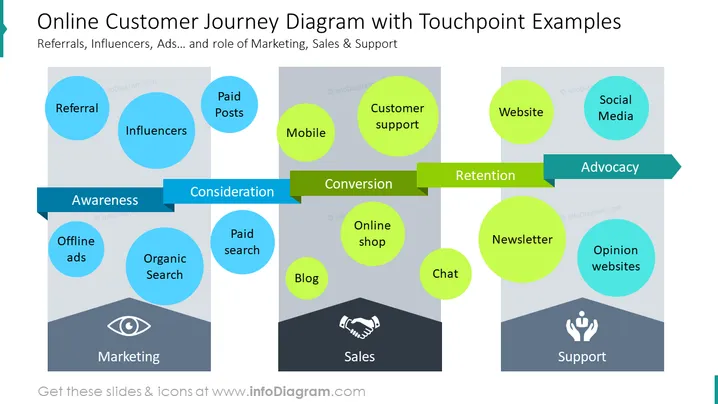
The online shopping customer journey presented in this slide shows us how the client gets acquainted with a product and service, up to the advocacy statement. In the awareness stage, the customer relies on organic research, referral, influencers, and offline ads. During consideration, the customer is relying on a paid post and paid search. The conversion or purchase occurs through mobile, customer support, online shop, blog, and/or chat. Customer retention can be done through the website and newsletter. As a final step, the customer spreads advocacy through review pages, forums, and social media posts.
##Slide infographic description:
White Background, Ribbon Banner Vector, Touchpoints, Column Layout, Eye Retina Icon, Handshake Icon, Partnership Icon, Support Icon, Color Coding, Editable Graphics



