
Reviews
Your graphics add a nice touch to my presentations and I recently used them for one of my all-hands meetings. Your toolbox adds professionalism to my slides. Instead of using standard clipart.
I needed a fresh look at some of my slides. I've tried to find a way to create a paintbrush effect, to underline, accentuate, add some color and the handwritten markers were just the things. Very easy to use, easy to size, change the color. It was an affordable, perfect solution and I'm happy to recommend it.
The crisp, clean look of the graphics, and the fact that it allowed me to easily edit and change the colors to match the template was my main reason for purchasing them.
Description
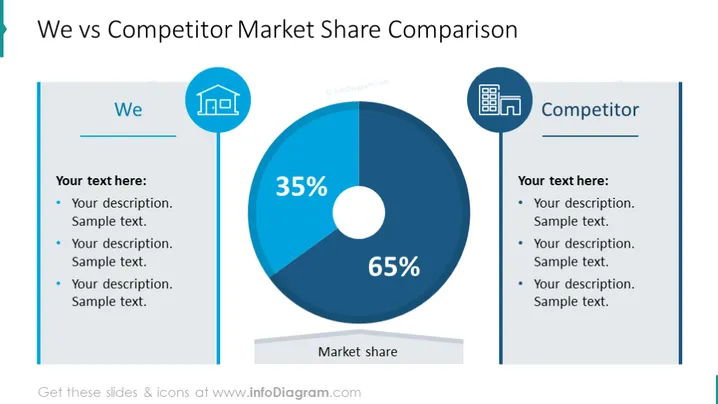
We vs Competitor Market Share Comparison
Slide Content
The slide is designed to compare the market share between "We" and a "Competitor" using a pie chart and text descriptions. The pie chart prominently displays two segments, one representing 35% of the market share and the other taking up 65%. Next to each heading—”We” and “Competitor”—there are spaces for descriptions, indicating the possibility to elaborate on each entity’s strengths or market position. Each section has three bullet points for adding custom text that will describe reasons or factors behind the market share distribution.
Graphical Look
- The slide background is plain white.
- On the left, there's a vertical blue banner with the title "We" in white text, accompanied by a building icon inside a hexagon.
- On the right, a similar style banner with "Competitor" written in white text, also featuring a building icon in a hexagon.
- A centrally placed pie chart divides the market share, with dark blue representing 35% and a lighter blue representing 65%.
- Percentage values are clearly displayed in the center of the pie chart, with the term "Market share" beneath it.
- Three bulleted lists are provided for both "We" and "Competitor" sections to add descriptions.
- The font used for the text is modern and sans-serif.
The overall look of the slide is professional and clean, with a symmetrical design that directly contrasts two entities. The use of blue tones and simple icons gives it a corporate feel, enhancing readability and focus on the central data.
Use Cases
- Presenting a strategic business analysis comparing your company's market share to that of a competitor during a board meeting or shareholder presentation.
- Demonstrating the results of a recent marketing campaign or sales drive in a team meeting to highlight market position changes.
- Utilizing the slide in an investment or stakeholder pitch to showcase competitive standing and investment potential.
- Incorporating it into an annual report presentation to provide visual insights into market dynamics and company performance against competitors.
How to Edit
How to edit text & colors

How to expand / shorten diagram

How to Replace Icons in infoDiagram PPT


