
Reviews
Ihre Grafiken verleihen meinen Präsentationen eine nette Note, und ich habe sie kürzlich für eines meiner All-Hands-Meetings verwendet. Ihre Toolbox verleiht meinen Folien Professionalität, anstatt Standard-Clipart zu verwenden.
Ich brauchte einen neuen Blick auf einige meiner Folien. Ich habe versucht, einen Weg zu finden, einen Pinselschlag-Effekt zu erzielen, um zu unterstreichen, hervorzuheben, Farbe hinzuzufügen, und die handgeschriebenen Markierungen waren genau das Richtige. Sehr einfach zu bedienen, leicht in der Größe zu ändern, die Farbe zu ändern. Es war eine erschwingliche, perfekte Lösung und ich empfehle sie gerne weiter.
Die klare, saubere Optik der Grafiken und die Tatsache, dass ich die Farben leicht bearbeiten und an die Vorlage anpassen konnte, war mein Hauptgrund für den Kauf.
Description
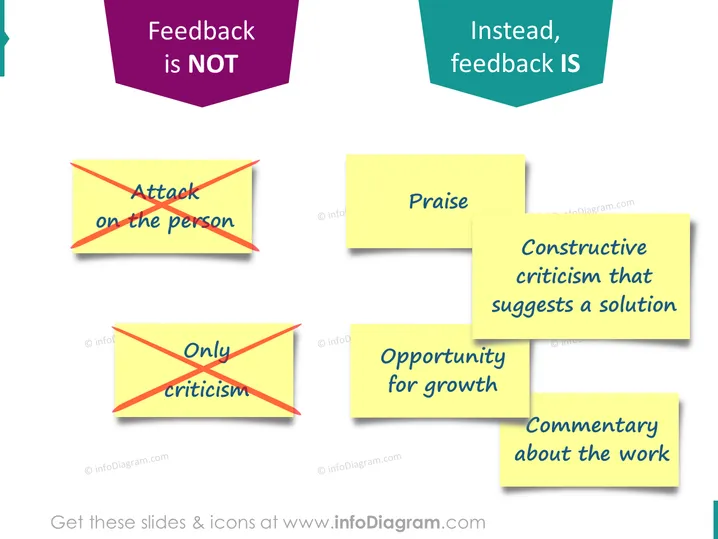
Feedback is NOT Instead, feedback IS
Slide Content
The PowerPoint slide juxtaposes ineffective and effective feedback practices. On the left, under the header "Feedback is NOT," are examples of unproductive feedback: "Attack on the person" and "Only criticism," both indicative of personal attacks and unconstructive negativity that hamper collaboration and learning. On the right, under "Instead, feedback IS," are exemplified effective feedback techniques: "Praise," "Constructive criticism that suggests a solution," "Opportunity for growth," and "Commentary about the work," which encourage positive reinforcement, collective problem-solving, development opportunities, and focus on the task.
Graphical Look
- The slide has two distinct sections titled with arrow shapes pointing towards their respective lists.
- The left section contains two yellow post-it note graphics, each crossed out in red, symbolizing negative feedback types.
- The right section contains four yellow post-it notes describing positive feedback types, with no red crossing.
- A two-toned (pink on the left, teal on the right) pentagonal divider separates the "NOT" from the "IS" sections at the top.
- Each post-it note has a slight shadow, giving the appearance of being slightly raised off the slide background.
The overall look is vibrant and engaging, with the contrasting colors and post-it note graphics effectively highlighting the do's and don'ts of giving feedback. The use of shadows adds depth to the visuals on the slide.
Use Cases
- Utilized during managerial or HR training sessions to educate about effective communication and feedback practices.
- Incorporated in team-building workshops to improve interpersonal dynamics and foster a positive feedback culture.
- Presented in performance evaluation meetings as a guide for constructive dialogue between supervisors and employees.
- Used in educational settings, such as teacher training, to enhance the feedback provided to students.
How to Edit
How to edit text & colors

How to expand / shorten diagram

How to Replace Icons in infoDiagram PPT


