
Reviews
Sus gráficos añaden un toque agradable a mis presentaciones y recientemente los usé para una de mis reuniones generales. Su conjunto de herramientas añade profesionalismo a mis diapositivas. En lugar de usar imágenes prediseñadas estándar.
Necesitaba un aspecto fresco para algunas de mis diapositivas. Había intentado encontrar una forma de crear un efecto de pincel, de subrayar, acentuar, añadir algo de color y los marcadores escritos a mano fueron justo lo que necesitaba. Muy fácil de usar, fácil de ajustar el tamaño, cambiar el color. Fue una solución asequible y perfecta, y estoy feliz de recomendarla.
El aspecto nítido y limpio de los gráficos, y el hecho de que me permitiera editar y cambiar fácilmente los colores para que coincidieran con la plantilla fue mi principal razón para comprarlos.
Description
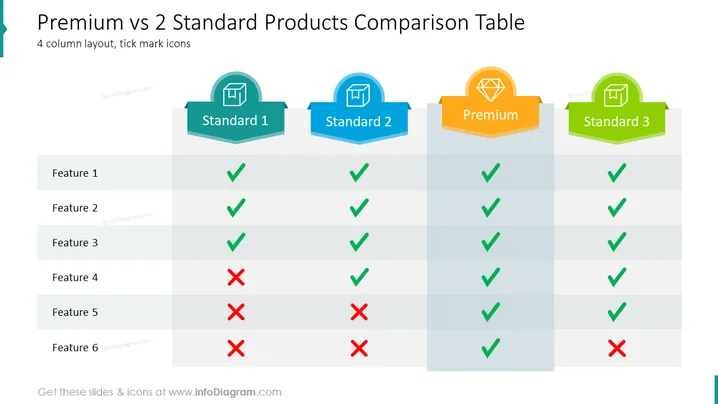
Premium vs 2 Standard Products Comparison Table
Slide Content
This slide presents a comparison table that contrasts the features of a Premium product against two Standard products. The table consists of six features, with green check marks indicating the presence of a feature and red crosses denoting its absence. Standard 1 offers four features; Standard 2 provides five, and the premium product includes all but one. This concise visual representation effectively communicates the comparative advantages and disadvantages of each product offering.
Graphical Look
- The slide has a clean, structured design utilizing a four-column layout.
- Each column header is represented by a unique color and icon within a badge-shaped graphic, creating a visually distinct label for each product category.
- Green check marks and red crosses, stylized with a slight 3D effect, visually represent the availability or absence of features across the products.
- Alternating shades of grey for each row enhance readability by differentiating between the listed features.
- There's a light blue banner on the left with a cut corner, complementing the color scheme and serving as a visual anchor.
The overall look of the slide is modern and business-like, with a clear emphasis on comparison through visual cues. The colors and shapes are used consistently to aid in quickly distinguishing between the different products and features.
Use Cases
- To present product comparisons during sales or marketing presentations to highlight the differences between various tiers or packages.
- In internal strategy meetings to discuss product development priorities by analyzing competitive product features.
- For use in client or investor pitches to showcase the added value of a premium offering compared to standard versions.
- In trade shows or product demonstrations, as a visual aid to quickly communicate the benefits and distinctions of a product lineup to potential customers.
How to Edit
How to edit text & colors

How to expand / shorten diagram

How to Replace Icons in infoDiagram PPT


