
Reviews
Ihre Grafiken verleihen meinen Präsentationen eine nette Note, und ich habe sie kürzlich für eines meiner All-Hands-Meetings verwendet. Ihre Toolbox verleiht meinen Folien Professionalität, anstatt Standard-Clipart zu verwenden.
Ich brauchte einen neuen Blick auf einige meiner Folien. Ich habe versucht, einen Weg zu finden, einen Pinselschlag-Effekt zu erzielen, um zu unterstreichen, hervorzuheben, Farbe hinzuzufügen, und die handgeschriebenen Markierungen waren genau das Richtige. Sehr einfach zu bedienen, leicht in der Größe zu ändern, die Farbe zu ändern. Es war eine erschwingliche, perfekte Lösung und ich empfehle sie gerne weiter.
Die klare, saubere Optik der Grafiken und die Tatsache, dass ich die Farben leicht bearbeiten und an die Vorlage anpassen konnte, war mein Hauptgrund für den Kauf.
Description
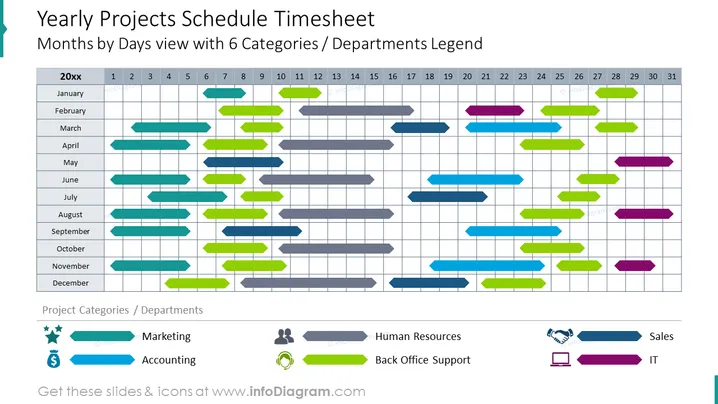
##Yearly Projects Schedule Timesheet Diagram
Use this rich Gantt chart to present projects related to 6 departments in your company. Be clear with your message thanks to the color-coding, Meaningful icons illustrating each project owner, and editable project indicators placed against the yearly schedule timesheet divided into months and days. Learn more about the Gannt chart on Wikipedia.
##What Does This Yearly Projects Schedule Timesheet Diagram Include?
- Calendar yearly timesheet divided into 12 months and days in a given month
- Editable arrow-shaped and color-coded project markers placed against the timetable
- Color-coded legend section with icons for 6 departments
- Flat icons of stars, marketing, money, accounting, team, HR, assistance, support, handshake, agreement, sales, laptop, IT
This Yearly Projects Schedule Timesheet Diagram is a part of our Gantt Chart Graphics for Project Planning PPT Template.
How to Edit
How to edit text & colors

How to expand / shorten diagram

How to Replace Icons in infoDiagram PPT


