
Reviews
Your graphics add a nice touch to my presentations and I recently used them for one of my all-hands meetings. Your toolbox adds professionalism to my slides. Instead of using standard clipart.
I needed a fresh look at some of my slides. I've tried to find a way to create a paintbrush effect, to underline, accentuate, add some color and the handwritten markers were just the things. Very easy to use, easy to size, change the color. It was an affordable, perfect solution and I'm happy to recommend it.
The crisp, clean look of the graphics, and the fact that it allowed me to easily edit and change the colors to match the template was my main reason for purchasing them.
Description
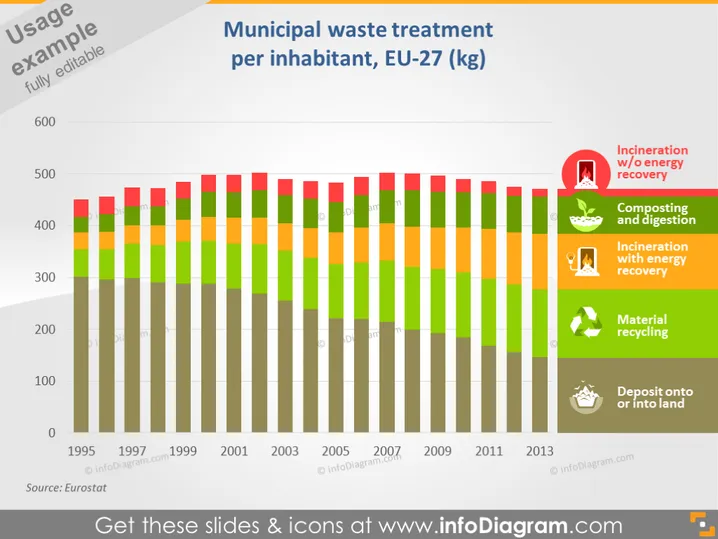
Municipal waste treatment per inhabitant, EU-27 (kg)
Slide Content
The slide presents data on the municipal waste treatment per inhabitant within the EU-27, measured in kilograms. The content shows a stacked bar chart covering the years from 1995 to 2013. Each bar represents a year and is divided into five sections, each indicating different waste treatment processes: incineration without energy recovery, composting and digestion, incineration with energy recovery, material recycling, and deposit onto or into land. The colors and size of the sections change over the years, reflecting shifts in waste management practices.
Graphical Look
- A stacked bar chart dominates the slide, with each bar representing a year from 1995 to 2013.
- The bars are color-coded to differentiate the waste treatment processes: red (incineration without energy recovery), orange (composting and digestion), green (incineration with energy recovery), yellow-green (material recycling), and gray (deposit onto or into land).
- A legend on the right side matches colors to their respective waste treatment methods, each with a corresponding icon.
- The title of the slide is housed in a white text box with a blue background, located at the top.
- Below the title is a gray horizontal line separating the title from the rest of the content.
- A source citation ("Source: Eurostat") is positioned at the bottom left corner of the slide.
- The y-axis of the bar chart is labeled with numbers from 100 to 600, the x-axis with years, and both have a white font color.
- Each bar has a subtle shadow effect, giving a slight 3D appearance.
The slide sports a professional and clean design with a clear visual representation of the data through the use of color coding and icons. The contrast between the colors and the structured arrangement of the elements facilitates an easy understanding of the information.
Use Cases
- Presenting historical data on waste management practices to policymakers or environmental agencies to highlight trends and changes over time.
- Utilizing in environmental studies or sustainability courses to educate about waste treatment evolution in the EU-27 region.
- Incorporating into business presentations for waste management or recycling companies to discuss market changes and potential opportunities.
- Showcasing in reports or proposals related to environmental impact assessments to provide context on regional waste treatment strategies.
How to Edit
How to edit text & colors

How to expand / shorten diagram

How to Replace Icons in infoDiagram PPT


