
Reviews
Sus gráficos añaden un toque agradable a mis presentaciones y recientemente los usé para una de mis reuniones generales. Su conjunto de herramientas añade profesionalismo a mis diapositivas. En lugar de usar imágenes prediseñadas estándar.
Necesitaba un aspecto fresco para algunas de mis diapositivas. Había intentado encontrar una forma de crear un efecto de pincel, de subrayar, acentuar, añadir algo de color y los marcadores escritos a mano fueron justo lo que necesitaba. Muy fácil de usar, fácil de ajustar el tamaño, cambiar el color. Fue una solución asequible y perfecta, y estoy feliz de recomendarla.
El aspecto nítido y limpio de los gráficos, y el hecho de que me permitiera editar y cambiar fácilmente los colores para que coincidieran con la plantilla fue mi principal razón para comprarlos.
Description
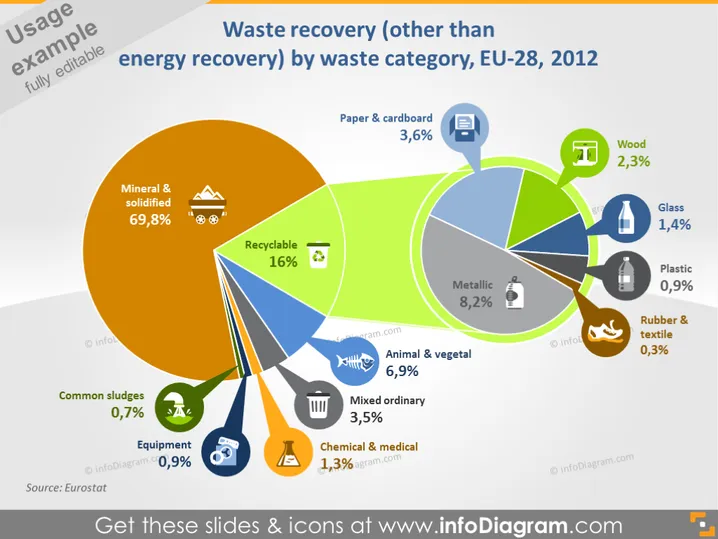
Waste recovery (other than energy recovery) by waste category, EU-28, 2012
Slide Content
This slide presents statistics on waste recovery in the EU-28 for the year 2012, excluding energy recovery. It focuses on the breakdown by waste category, with a pie chart that points to individual sub-charts for each category. Mineral and solidified waste dominates at 69.8%, followed by recyclables at 16%, and metallic wastes at 8.2%. Other categories include paper & cardboard, wood, glass, plastic, rubber & textile, animal & vegetal, common sludges, equipment, chemical & medical, and mixed ordinary wastes with percentages ranging from 0.3% to 6.9%.
Graphical Look
- The slide features a dominant central pie chart with various colors representing different waste categories.
- Multiple smaller charts branch out from the central pie chart, each connected with a line matching their slice's color.
- Each sub-chart is a circular diagram with a specific color and an icon symbolizing the waste category it represents.
- Percentage figures are clearly displayed next to each category name, which are positioned along curved paths surrounding the chart.
- The background is a gradient from light yellow to green, with a white border at the slide's bottom edge.
- The title of the slide is in a dark gray font at the top.
- There are two text boxes near the bottom-left displaying the slide's source.
The slide has a vibrant and informative design with a clear visual hierarchy that emphasizes the statistics provided. The use of colors, icons, and percentages aids in quick comprehension of the data.
Use Cases
- In environmental presentations to showcase how different types of waste are being recovered or recycled.
- During policy briefings to explain the current state and challenges of waste management in the EU.
- As part of educational materials to inform students about waste categorization and recovery rates.
- In business meetings by companies in the waste management or recycling industry to discuss market segments and opportunities for improvement or investment.
How to Edit
How to edit text & colors

How to expand / shorten diagram

How to Replace Icons in infoDiagram PPT


