
Reviews
Sus gráficos añaden un toque agradable a mis presentaciones y recientemente los usé para una de mis reuniones generales. Su conjunto de herramientas añade profesionalismo a mis diapositivas. En lugar de usar imágenes prediseñadas estándar.
Necesitaba un aspecto fresco para algunas de mis diapositivas. Había intentado encontrar una forma de crear un efecto de pincel, de subrayar, acentuar, añadir algo de color y los marcadores escritos a mano fueron justo lo que necesitaba. Muy fácil de usar, fácil de ajustar el tamaño, cambiar el color. Fue una solución asequible y perfecta, y estoy feliz de recomendarla.
El aspecto nítido y limpio de los gráficos, y el hecho de que me permitiera editar y cambiar fácilmente los colores para que coincidieran con la plantilla fue mi principal razón para comprarlos.
Description
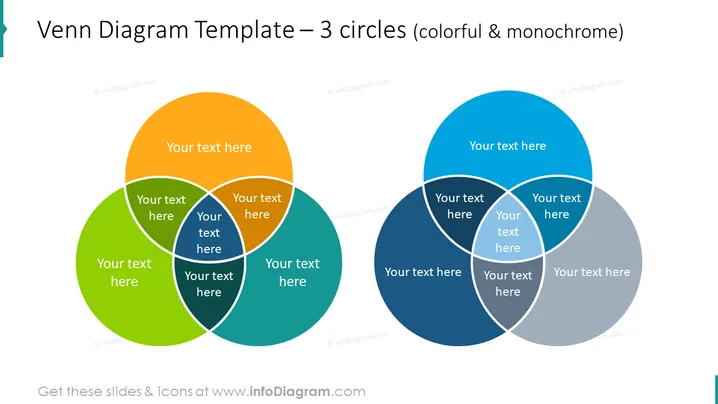
Venn Diagram Template – 3 circles (colorful & monochrome)
Slide Content
This PowerPoint slide features two sets of Venn diagrams, one in full color and the other in shades of blue and gray, indicating it's a monochrome version. Each set consists of three overlapping circles with space for text in each segment, allowing for representation of relationships and commonalities between different concepts or ideas. Venn diagrams are commonly used to visualize logical relationships between different sets, making them ideal for comparing characteristics or finding the intersection of different elements.
Graphical Look
- The slide is divided vertically into two sections, with the colorful Venn diagram on the left and the monochrome one on the right.
- Both Venn diagrams are composed of three overlapping circles, each with a drop shadow to create a sense of depth.
- The circles on the left Venn diagram are filled with solid, distinct colors - orange, green, and blue.
- The circles on the right Venn diagram are filled with different shades of blue and a grey, adhering to a monochromatic color scheme.
- Each circle contains text placeholders labeled "Your text here," positioned centrally in the individual circles and in their intersections.
- The style of the diagrams is flat with no gradients, aside from the shadows, which gives a modern and clean appearance.
The overall look is simple and professional with a clear distinction between colorful and monochrome pallets, which can be used to tailor the slide to the presentation's color scheme or to differentiate between themes.
Use Cases
- To compare and contrast three different concepts, ideas, or groups and illustrate shared or unique attributes.
- In a business strategy meeting, to examine the overlap between different market segments or customer groups.
- During a project kickoff to discuss areas of responsibilities among different departments or team members.
- In an educational setting to teach students about sets, logic, and categorization.
How to Edit
How to edit text & colors

How to expand / shorten diagram

How to Replace Icons in infoDiagram PPT


