
Reviews
Your graphics add a nice touch to my presentations and I recently used them for one of my all-hands meetings. Your toolbox adds professionalism to my slides. Instead of using standard clipart.
I needed a fresh look at some of my slides. I've tried to find a way to create a paintbrush effect, to underline, accentuate, add some color and the handwritten markers were just the things. Very easy to use, easy to size, change the color. It was an affordable, perfect solution and I'm happy to recommend it.
The crisp, clean look of the graphics, and the fact that it allowed me to easily edit and change the colors to match the template was my main reason for purchasing them.
Description
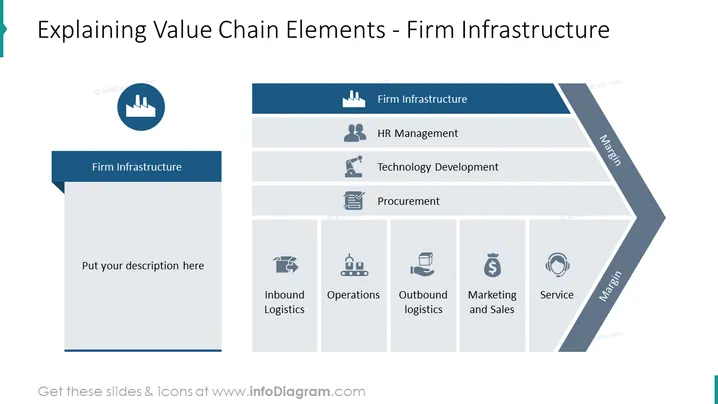
Explaining Value Chain Elements - Firm Infrastructure
Slide Content
The slide is aimed at explaining the different elements of the value chain with a focus on "Firm Infrastructure." It details the primary activities such as Inbound Logistics, Operations, Outbound logistics, Marketing and Sales, and Service, and the support activities, which includes HR Management, Technology Development, and Procurement. Each primary activity is essential for delivering products to customers, whereas support activities are crucial for maintaining the company's operations efficiently.
Graphical Look
- The slide features a palette of blues and grays.
- A factory-like icon at the very top represents value chain concept.
- The slide title is prominently displayed at the top in bold text.
- To the left, a large text area labeled "Firm Infrastructure" allows for additional descriptions or notes.
- The main body of the slide is divided into labeled sections, each representing an element of the value chain.
- Each value chain element is paired with a descriptive icon: human silhouette for HR, gears for Technology Development, and a clipboard for Procurement.
- There are additional icons for the primary activities below: a truck for Inbound Logistics, factory for Operations, vehicle for Outbound Logistics, "S" dollar sign for Marketing and Sales, and handshake for Service.
- The right side features a shaded area with the word "Margin" indicating the result of these activities.
The slide has a professional and systematic look with its organized structure and relevant icons. The color scheme provides a clear distinction between different sections and focuses attention on the main topic.
Use Cases
- Presenting an overview of a company's value chain in a business strategy meeting.
- Educational purposes, such as teaching business students about the components of a value chain.
- Internal training sessions for employees to understand how their roles fit into the larger company process.
- Consulting presentations to help clients identify areas of improvement within their firm infrastructure.
How to Edit
How to edit text & colors

How to expand / shorten diagram

How to Replace Icons in infoDiagram PPT


