
Reviews
Sus gráficos añaden un toque agradable a mis presentaciones y recientemente los usé para una de mis reuniones generales. Su conjunto de herramientas añade profesionalismo a mis diapositivas. En lugar de usar imágenes prediseñadas estándar.
Necesitaba un aspecto fresco para algunas de mis diapositivas. Había intentado encontrar una forma de crear un efecto de pincel, de subrayar, acentuar, añadir algo de color y los marcadores escritos a mano fueron justo lo que necesitaba. Muy fácil de usar, fácil de ajustar el tamaño, cambiar el color. Fue una solución asequible y perfecta, y estoy feliz de recomendarla.
El aspecto nítido y limpio de los gráficos, y el hecho de que me permitiera editar y cambiar fácilmente los colores para que coincidieran con la plantilla fue mi principal razón para comprarlos.
Description
Transformation Decision Recommendation
Slide Content
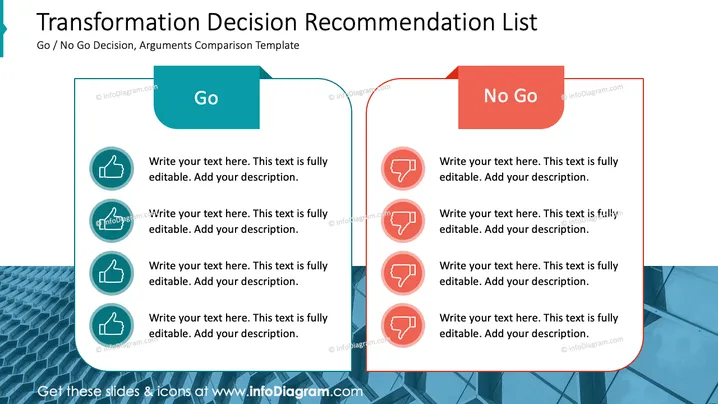
The slide is structured as a comparison list to weigh the pros and cons of a "Go / No Go Decision" for a proposed transformation or change. The "Go" section on the left lists positive arguments, each accompanied by a thumbs-up symbol, indicating approval or consent. These can be detailed by the presenter to build a case for moving forward with the decision. Conversely, the "No Go" section on the right, denoted by thumbs-down symbols, is used for documenting reasons against the decision.
Graphical Look
- The slide background is white with a large, aqua-blue pattern covering the lower left corner, giving a modern and dynamic feel.
- A thick, teal-colored vertical line bisects the slide into two equal halves, symbolizing the balance between the two decision options.
- The left half has a light blue overlay with rounded edges and a "Go" label in a darker blue, rotated rectangle tag.
- The right half has a similar overlay but in coral red with the "No Go" label in a red, rotated rectangle tag.
- Each half contains four circular icons with thumbs-up symbols on the left and thumbs-down on the right, each paired with text placeholders for arguments.
- The icons are colored to match the theme — teal on the left and coral red on the right — enhancing visual synchronization.
The overall look of the slide is crisp and professional, with a strong visual metaphor of balance and comparison through the color-coordinated design and iconography.
Use Cases
- Presenting the advantages and disadvantages of a specific business strategy during executive decision-making meetings.
- Comparing the potential outcomes of two different project directions during a project management review.
- Conducting a risk-benefit analysis in front of stakeholders for an upcoming change initiative.
- Facilitating a group discussion in a workshop setting to collaboratively reach a consensus on a controversial topic.
How to Edit
How to edit text & colors

How to expand / shorten diagram

How to Replace Icons in infoDiagram PPT


