
Your graphics add a nice touch to my presentations and I recently used them for one of my all-hands meetings. Your toolbox adds professionalism to my slides. Instead of using standard clipart.
Claude Jones, Director of Engineer, @Walmartlabs, USA
Your graphics add a nice touch to my presentations and I recently used them for one of my all-hands meetings. Your toolbox adds professionalism to my slides. Instead of using standard clipart.
Claude Jones, Director of Engineer, @Walmartlabs, USA
I needed a fresh look at some of my slides. I've tried to find a way to create a paintbrush effect, to underline, accentuate, add some color and the handwritten markers were just the things. Very easy to use, easy to size, change the color. It was an affordable, perfect solution and I'm happy to recommend it.
Anonymous, US
The crisp, clean look of the graphics, and the fact that it allowed me to easily edit and change the colors to match the template was my main reason for purchasing them.
Brandie Jenkins, E-learning Developer, USA
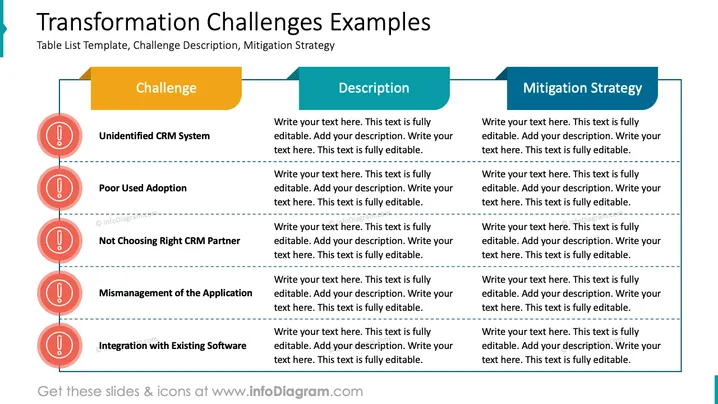
The slide is a structured table list template used to outline various challenges regarding organizational transformation. It breaks down each identified challenge into a description and a corresponding mitigation strategy. The challenges listed include "Unidentified CRM System," implying the lack of a clear CRM strategy or tool; "Poor User Adoption," which suggests difficulties in getting staff to utilize new systems; "Not Choosing Right CRM Partner," highlighting the importance of selecting a suitable CRM vendor; "Mismanagement of the Application," which could refer to poor application maintenance or incorrect use; and "Integration with Existing Software," indicating potential issues with software compatibility or data synchronization.
The slide is well-organized with a clear hierarchy of information and contrasting colors that guide the viewer through each element of the presentation effectively.
The slide titled "Transformation Challenges Examples" provides a framework for discussing organizational change obstacles, with tabs for outlining specific challenges, their descriptions, and mitigation strategies. Notable challenges include "Unidentified CRM System," which hints at the need for clarity in customer relation management tools; "Poor User Adoption," suggesting issues in getting personnel to embrace new technology; "Not Choosing Right CRM Partner," emphasizing the importance of a compatible vendor relationship; "Mismanagement of the Application," referring to suboptimal usage; and "Integration with Existing Software," discussing the harmonization of new and old systems.
The slide is visually balanced with a professional appearance. The use of color-coding differentiates between categories and guides the viewer's eye from challenge to problem analysis to solution.




