
Traditional vs. Hybrid Org Chart with AI Agents

Slide Content

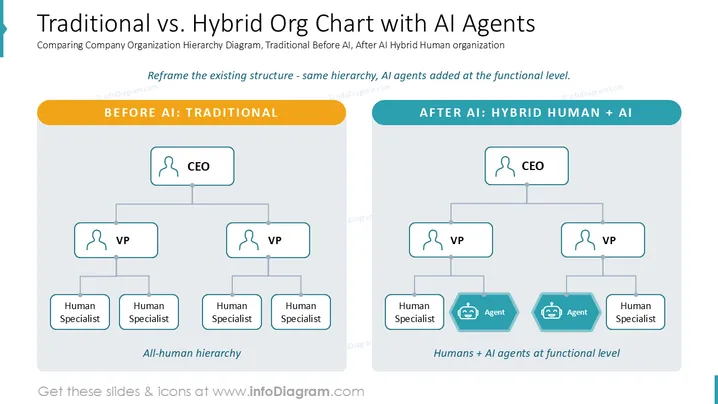
This slide compares a traditional organizational chart with a hybrid one that incorporates AI agents. The left side shows a traditional, all-human hierarchy, illustrating how teams are structured before the integration of AI. The right side presents a hybrid model where AI agents are introduced at the functional (specialist) level, signifying the evolution of team composition. This reframes the existing hierarchy by adding AI without changing the core management structure.

Graphical Look

  • The overall slide background is white.
  • A light grey, thin, vertical bar with a dark teal arrow-like shape at the top is present on the left side.
  • The slide title is in large, black font at the top, with a subtitle below it in smaller, black font.
  • A descriptive sentence in dark teal italicized font is centered below the subtitle.
  • Two large vertical rectangles with rounded top corners are positioned side-by-side on the slide, both with a light grey fill and a subtle drop shadow.
  • The left rectangle has an orange header with rounded corners labeled "BEFORE AI: TRADITIONAL" in white capital letters.
  • The right rectangle has a dark teal header with rounded corners labeled "AFTER AI: HYBRID HUMAN + AI" in white capital letters.
  • Both rectangles contain organizational charts with a "CEO" at the top in a white rectangular box with rounded corners and a thin dark teal outline, connected by a vertical line.
  • Below the CEO, two "VP" roles are depicted in similar rectangular boxes, connected by horizontal lines to the CEO's vertical line, and then by vertical lines downwards.
  • On the left chart ("BEFORE AI"), below each VP, two "Human Specialist" roles are shown in identical rectangular boxes, making for a total of four human specialists.
  • On the right chart ("AFTER AI"), below the left VP, one "Human Specialist" and one "Agent" are depicted. The "Agent" is in a hexagonal shape with rounded corners, colored dark teal with a light blue outline, and contains a white icon of a smiling robot face.
  • Below the right VP on the right chart, one "Agent" in the same dark teal hexagonal shape with a robot icon, and one "Human Specialist" in a white rectangular box are shown.
  • Below the left chart, the text "All-human hierarchy" is written in dark teal italicized font.
  • Below the right chart, the text "Humans + AI agents at functional level" is written in dark teal italicized font.

The slide utilizes a clean, minimal design with a clear division to compare two organizational structures. Color coding effectively differentiates the "before" and "after" scenarios and highlights the AI agents.

Use Cases

  • Introducing AI integration: To visually explain how AI will be incorporated into an existing company structure.
  • Strategic planning meetings: For executives to discuss the future organizational design and resource allocation with AI.
  • Change management presentations: To communicate to employees how their roles and the company structure might evolve with AI.
  • Showcasing innovation: Demonstrating a forward-thinking approach to work by integrating artificial intelligence into functional teams.
Traditional vs. Hybrid Org Chart with AI Agents

Traditional vs. Hybrid Org Chart with AI Agents

Part of deckAI-Era Org Chart Templates for PowerPoint (Human + AI Agent Teams)


