
Reviews
Sus gráficos añaden un toque agradable a mis presentaciones y recientemente los usé para una de mis reuniones generales. Su conjunto de herramientas añade profesionalismo a mis diapositivas. En lugar de usar imágenes prediseñadas estándar.
Necesitaba un aspecto fresco para algunas de mis diapositivas. Había intentado encontrar una forma de crear un efecto de pincel, de subrayar, acentuar, añadir algo de color y los marcadores escritos a mano fueron justo lo que necesitaba. Muy fácil de usar, fácil de ajustar el tamaño, cambiar el color. Fue una solución asequible y perfecta, y estoy feliz de recomendarla.
El aspecto nítido y limpio de los gráficos, y el hecho de que me permitiera editar y cambiar fácilmente los colores para que coincidieran con la plantilla fue mi principal razón para comprarlos.
Description
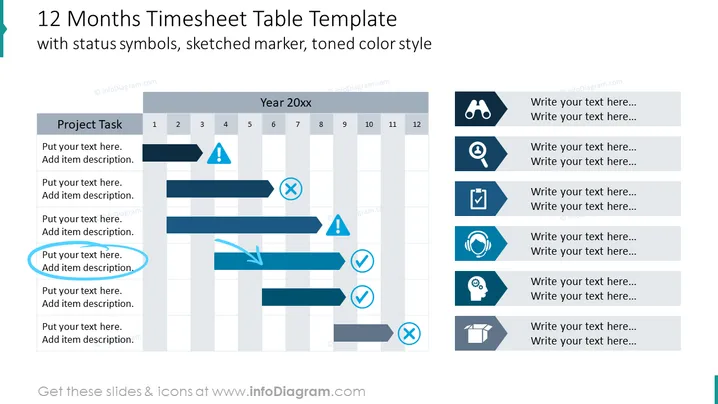
12 Months Timesheet Table Template
Slide Content
The slide is titled "12 Months Timesheet Table Template with status symbols, sketched marker, toned color style" and displays a visual representation of a project's timeline over a 12-month period. It includes sections for "Project Task", yearly quarters, and various status symbols like a warning sign, cross, check mark, and others. Each task row has space for a description and corresponding bars span across months, depicting the duration and status of tasks. Status symbols indicate the progress or issues associated with specific tasks and project phases.
Graphical Look
- The slide background is plain white.
- A large title is prominently displayed at the top in dark blue text.
- There is a table with rows labeled "Project Task" to the left, each featuring a placeholder text box and grey background.
- Horizontal bars of various lengths represent the project timelines, with sketched styling.
- Symbols such as warning signs, checks, and crosses, all in blue, are used to indicate the status of tasks.
- A vertical header along the top lists the 12 months, with "Year 20xx" as the header.
- To the right, there are symbol legends, each with an icon and accompanying text boxes for further explanation.
- A light grey alternating color is used to differentiate rows for enhanced readability.
- The overall visual weight is balanced, with a clear differentiation between the text and graphical elements.
The slide uses muted tones of blue and grey to present an organized and clear timeline. The sketched style of the icons and bars gives the slide an informal, yet professional appearance.
Use Cases
- To visually track and present the progress of various projects over a calendar year to stakeholders.
- As a tool for project managers to report on the current status of tasks and milestones during team meetings or reviews.
- To forecast project planning and resource allocation for the upcoming months during strategic business planning sessions.
- As an illustrative summary for annual reports that need to showcase project timelines and achievements through a year.
How to Edit
How to edit text & colors

How to expand / shorten diagram

How to Replace Icons in infoDiagram PPT


