

Your graphics add a nice touch to my presentations and I recently used them for one of my all-hands meetings. Your toolbox adds professionalism to my slides. Instead of using standard clipart.
Claude Jones, Director of Engineer, @Walmartlabs, USA

Your graphics add a nice touch to my presentations and I recently used them for one of my all-hands meetings. Your toolbox adds professionalism to my slides. Instead of using standard clipart.
Claude Jones, Director of Engineer, @Walmartlabs, USA
I needed a fresh look at some of my slides. I've tried to find a way to create a paintbrush effect, to underline, accentuate, add some color and the handwritten markers were just the things. Very easy to use, easy to size, change the color. It was an affordable, perfect solution and I'm happy to recommend it.
Anonymous, US
The crisp, clean look of the graphics, and the fact that it allowed me to easily edit and change the colors to match the template was my main reason for purchasing them.
Brandie Jenkins, E-learning Developer, USA
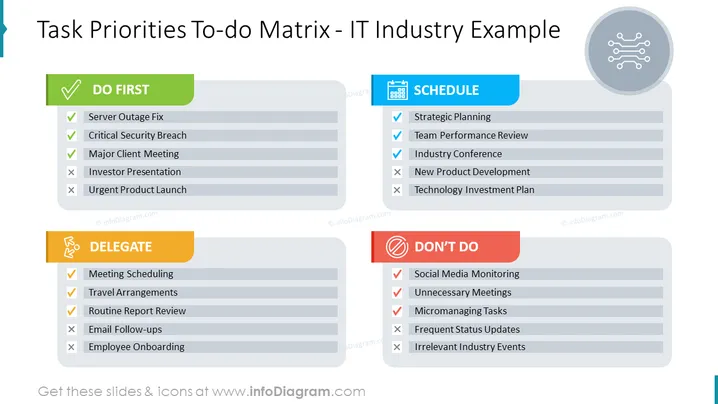
The slide presents a matrix categorizing tasks according to their priority level, specifically tailored for the IT industry. The "DO FIRST" category includes urgent and critical tasks like Server Outage Fix, Critical Security Breach, and Major Client Meeting. These are tasks considered crucial for immediate attention. "DELEGATE" consists of tasks like Meeting Scheduling, Travel Arrangements, and Routine Report Review, which are important but can be assigned to others. The "SCHEDULE" category is for important but not urgent items such as Strategic Planning and Team Performance Review, which require planned execution. Lastly, "DON'T DO" comprises tasks that are deemed low-priority or unnecessary, like Social Media Monitoring and Unnecessary Meetings, which should be minimized or eliminated.
The overall look of the slide is clean and professional, employing a color code to visually distinguish the categories. The use of icons and checkmarks/x marks enhances the comprehension of the task's status at a glance.



