

Your graphics add a nice touch to my presentations and I recently used them for one of my all-hands meetings. Your toolbox adds professionalism to my slides. Instead of using standard clipart.
Claude Jones, Director of Engineer, @Walmartlabs, USA

Your graphics add a nice touch to my presentations and I recently used them for one of my all-hands meetings. Your toolbox adds professionalism to my slides. Instead of using standard clipart.
Claude Jones, Director of Engineer, @Walmartlabs, USA
I needed a fresh look at some of my slides. I've tried to find a way to create a paintbrush effect, to underline, accentuate, add some color and the handwritten markers were just the things. Very easy to use, easy to size, change the color. It was an affordable, perfect solution and I'm happy to recommend it.
Anonymous, US
The crisp, clean look of the graphics, and the fact that it allowed me to easily edit and change the colors to match the template was my main reason for purchasing them.
Brandie Jenkins, E-learning Developer, USA
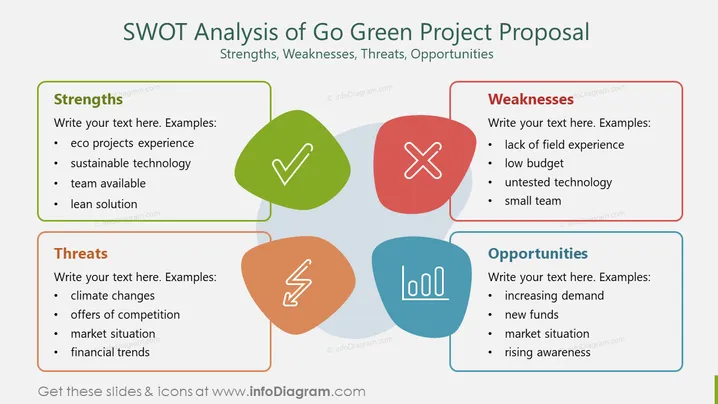
##Slide content: This PPT Template shows an example of a SWOT analysis of eco-friendly products. This Go Green SWOT Analysis contains strengths, weaknesses, opportunities, and threats. In the strengths box, you can write your eco projects experience, sustainable technology, team available, and lean solution. In the weaknesses section, you can write the lack of field experience, low budget, untested technology, and a small team. In the opportunities box, you can mention the increasing demand, new funds, market situation, and raising awareness. In the threats box, you can mention climate changes, offers of competition, market situation, and financial trends. You can use this SWOT Analysis if you are a marketing manager who wants to analyze the advantages and disadvantages of your company's new eco-friendly products. This strategy will help you plan a suitable strategy that will help your business grow and gain an advantage over competitors in the business. You can download this template on Google Slides and Keynote. ##Slide infographic description: White Background, Text Box, Colorful SWOT Analysis, Colorful Reusable Organic Shapes, Checkmark Icon, Crossmark Icon, Danger Icon, Bar Chart Icon



