
Reviews
Sus gráficos añaden un toque agradable a mis presentaciones y recientemente los usé para una de mis reuniones generales. Su conjunto de herramientas añade profesionalismo a mis diapositivas. En lugar de usar imágenes prediseñadas estándar.
Necesitaba un aspecto fresco para algunas de mis diapositivas. Había intentado encontrar una forma de crear un efecto de pincel, de subrayar, acentuar, añadir algo de color y los marcadores escritos a mano fueron justo lo que necesitaba. Muy fácil de usar, fácil de ajustar el tamaño, cambiar el color. Fue una solución asequible y perfecta, y estoy feliz de recomendarla.
El aspecto nítido y limpio de los gráficos, y el hecho de que me permitiera editar y cambiar fácilmente los colores para que coincidieran con la plantilla fue mi principal razón para comprarlos.
Description
Poll Question's Responses Outcomes List Diagram
Slide Content
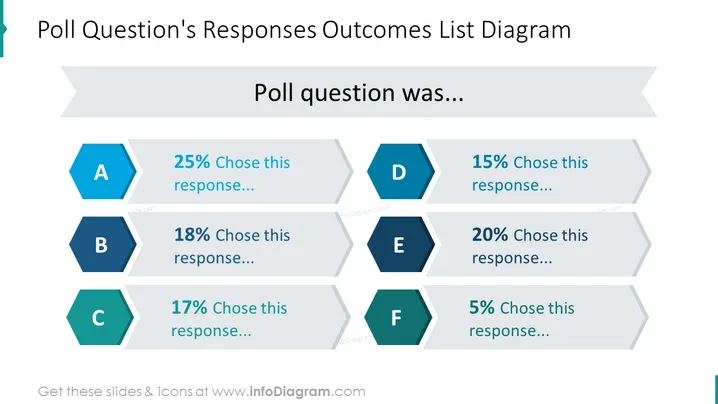
The slide presents the results of a poll question with six response options, labeled A to F. Each response option has an associated percentage, indicating the proportion of participants who selected that option. Response A was chosen by 25%, suggesting it was the most popular. Response B at 18% and Response C at 17% were moderately selected. Response D had a slightly lower preference at 15%, whereas Response E was favored by 20% of the respondents. The least preferred is Response F, with only 5% selecting it. This visual arrangement effectively conveys the distribution of poll answers.
Graphical Look
- The slide has a central title labeled "Poll Question's Responses Outcomes List Diagram" in a large, bold font.
- Below the title, the phrase "Poll question was..." is presented as a placeholder for the actual question text.
- Hexagonal icons labeled A to F are used to represent the different poll responses, each with a distinct color for easy differentiation.
- To the right of each hexagonal icon, there is a percentage bar and a text placeholder, indicating the portion of votes each response received.
- The percentage bars and text placeholders feature a slanted, progressively diminishing design, creating a visual flow from left to right.
The slide utilizes a clean and modern design with contrasting colors and geometric shapes to draw focus to the key information. The use of hexagons for responses and the flow of the percentage bars creates a dynamic yet organized appearance.
Use Cases
- Presenting survey results during a company meeting to facilitate data-driven discussions.
- Displaying audience feedback in a conference or workshop to summarize participant opinions.
- Visualizing customer preferences in a marketing presentation to highlight popular choices.
- Communicating election or referendum results within an organization to discuss implications and next steps.
How to Edit
How to edit text & colors

How to expand / shorten diagram

How to Replace Icons in infoDiagram PPT


