

Your graphics add a nice touch to my presentations and I recently used them for one of my all-hands meetings. Your toolbox adds professionalism to my slides. Instead of using standard clipart.
Claude Jones, Director of Engineer, @Walmartlabs, USA

Your graphics add a nice touch to my presentations and I recently used them for one of my all-hands meetings. Your toolbox adds professionalism to my slides. Instead of using standard clipart.
Claude Jones, Director of Engineer, @Walmartlabs, USA
I needed a fresh look at some of my slides. I've tried to find a way to create a paintbrush effect, to underline, accentuate, add some color and the handwritten markers were just the things. Very easy to use, easy to size, change the color. It was an affordable, perfect solution and I'm happy to recommend it.
Anonymous, US
The crisp, clean look of the graphics, and the fact that it allowed me to easily edit and change the colors to match the template was my main reason for purchasing them.
Brandie Jenkins, E-learning Developer, USA
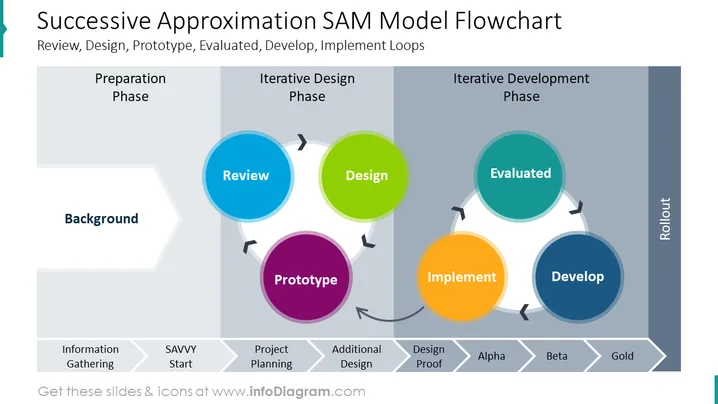
##Slide content: This slide shows the successive approximation model (SAM) with a flowchart. The flowchart shows the process in three phases: preparation, iterative design, and iterative development phase. During the preparation phase, in the background, the information has been gathered along with a savvy start. In the iterative design phase - a review, design, and prototype including project planning, and additional design. The last phase - iterative development, includes implementation, evaluation and development. This covers steps such as design proof, alpha version, beta, and finally gold. You can use this presentation if you're an educator, and want to present dense type of information in a simplified way to your audience, or for a company's internal purposes. You can download this slide in Google Slides and Keynote, without any quality loss. Editing instructions are also available if you don't have design skills. Click on the picture to see the whole Instructional Design PowerPoint template.
##Slide infographic description: Flowchart Diagram, Arrow Banner Vector, Gray Gradient Background, Color Coding



