
Reviews
Your graphics add a nice touch to my presentations and I recently used them for one of my all-hands meetings. Your toolbox adds professionalism to my slides. Instead of using standard clipart.
I needed a fresh look at some of my slides. I've tried to find a way to create a paintbrush effect, to underline, accentuate, add some color and the handwritten markers were just the things. Very easy to use, easy to size, change the color. It was an affordable, perfect solution and I'm happy to recommend it.
The crisp, clean look of the graphics, and the fact that it allowed me to easily edit and change the colors to match the template was my main reason for purchasing them.
Description
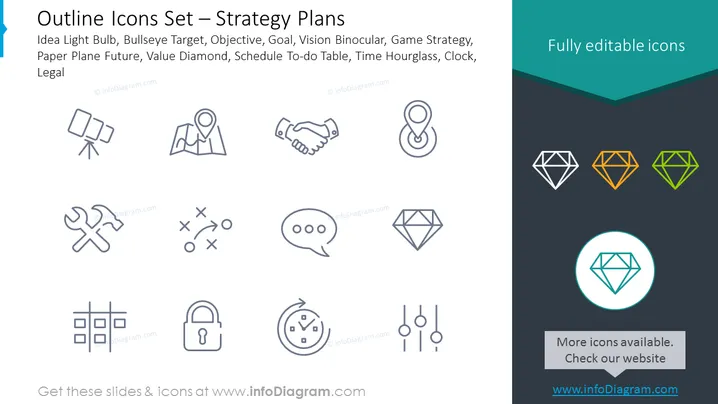
Outline Icons Set — Strategy Plans
Slide Content
The PowerPoint slide is titled "Outline Icons Set — Strategy Plans" and lists various icons representing strategic concepts. These include an Idea Light Bulb symbolizing creativity or a new idea, Bullseye Target representing specific objectives or precision goals, Objective visualized as two overlapping circles, Goal depicted by a handshake, which implies agreement or a goal achieved through collaboration, Vision Binocular indicating foresight or planning, Game Strategy shown as a tic-tac-toe game, suggesting tactics and competition, Paper Plane Future representing forward-thinking or innovation, Value Diamond symbolizing quality or worth, Schedule To-do Table as a list, signifying organized tasks, Time Hourglass for time management, Clock illustrating time, and Legal depicted by a lock, indicating security or compliance.
Graphical Look
-
The slide background is a gradient ranging from white to a shade of dark teal toward the bottom.
-
There are 12 icons evenly spaced in two rows. Each icon is depicted in a light gray outline style.
-
The first icon is a light bulb, symmetric with a flat-bottomed bulb cap.
-
The second icon represents a target with an arrow in the center.
-
The third icon features two overlapping circles, resembling a Venn diagram.
-
The fourth icon is a handshake, with two hands interlocking at the thumbs.
-
The fifth icon depicts a map pin with a location marker.
-
The sixth icon is a handshake, somewhat detailed with individual fingers represented.
-
The seventh icon portrays a paper plane, indicating direction or travel.
-
The eighth icon is a simplified diamond shape, representing value or preciousness.
-
The ninth icon suggests strategy or planning with a tic-tac-toe game.
-
The tenth icon is a speech bubble with three dots, indicating conversation or communication.
-
The eleventh icon shows an hourglass with sand in the top part, symbolizing time passing.
-
The twelfth icon is a traditional wall clock face with three Sorry, it appears I was cutoff mid-description. Let me complete the description followed by the summary and use cases.
-
The eleventh icon shows an hourglass with sand in the top part, symbolizing time passing.
-
The twelfth icon is a traditional wall clock face with two hands indicating a specific time.
-
The headline of the slide is in dark text aligned to the left-hand side, with a stylistic blue accent on the left border.
-
Three diamonds are presented at the bottom right corner, each filled with different colors—white, orange, and green—against the dark teal background, showcasing the icons' color-editable feature.
-
One of the icons—the diamond—is highlighted in a larger size within a bright teal circle, emphasizing its editability.
The overall look of the slide is clean, modern, and professional, using simple outline iconography to present a series of strategic concepts visually. The color palette is minimal, with accents of teal to draw attention to certain elements.
Use Cases
- To present different strategic concepts or components in a business plan or proposal.
- To illustrate the agenda or topics covered in a strategic planning meeting.
- For educational purposes, introducing various aspects of business strategy in a training or academic presentation.
- As a visual aid in marketing materials to represent services or products related to strategy consultancy or planning tools.
How to Edit
How to edit text & colors

How to expand / shorten diagram

How to Replace Icons in infoDiagram PPT


