

Your graphics add a nice touch to my presentations and I recently used them for one of my all-hands meetings. Your toolbox adds professionalism to my slides. Instead of using standard clipart.
Claude Jones, Director of Engineer, @Walmartlabs, USA

Your graphics add a nice touch to my presentations and I recently used them for one of my all-hands meetings. Your toolbox adds professionalism to my slides. Instead of using standard clipart.
Claude Jones, Director of Engineer, @Walmartlabs, USA
I needed a fresh look at some of my slides. I've tried to find a way to create a paintbrush effect, to underline, accentuate, add some color and the handwritten markers were just the things. Very easy to use, easy to size, change the color. It was an affordable, perfect solution and I'm happy to recommend it.
Anonymous, US
The crisp, clean look of the graphics, and the fact that it allowed me to easily edit and change the colors to match the template was my main reason for purchasing them.
Brandie Jenkins, E-learning Developer, USA
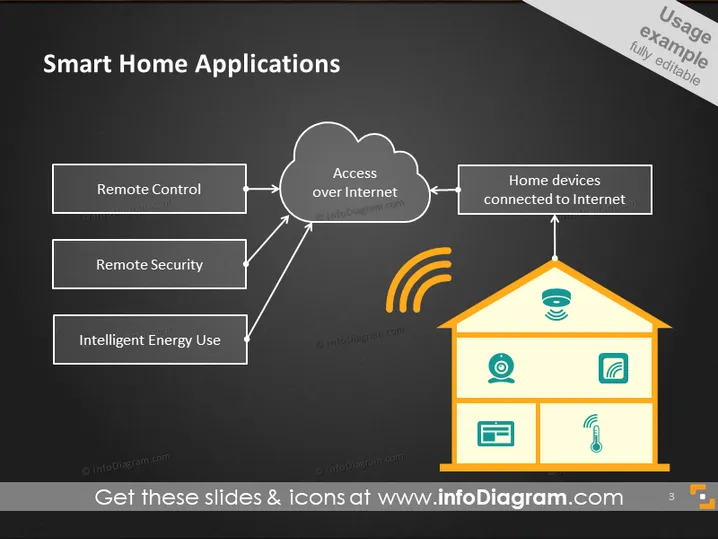
The PowerPoint slide is titled "Smart Home Applications" and illustrates three key application areas: Remote Control, which allows users to manage devices from afar; Remote Security, providing the means to monitor and protect home environments through technology; and Intelligent Energy Use, optimizing power consumption for efficiency and savings. These areas are connected to the concept of "Access over Internet," which is further linked to "Home devices connected to Internet," depicting the interconnectedness and internet dependency of smart home technology.
The overall design of the slide is modern and clean, using simple iconography to effectively convey the different aspects of smart home applications. The use of orange highlights provides a vibrant contrast, drawing attention to key elements.



