

Your graphics add a nice touch to my presentations and I recently used them for one of my all-hands meetings. Your toolbox adds professionalism to my slides. Instead of using standard clipart.
Claude Jones, Director of Engineer, @Walmartlabs, USA

Your graphics add a nice touch to my presentations and I recently used them for one of my all-hands meetings. Your toolbox adds professionalism to my slides. Instead of using standard clipart.
Claude Jones, Director of Engineer, @Walmartlabs, USA
I needed a fresh look at some of my slides. I've tried to find a way to create a paintbrush effect, to underline, accentuate, add some color and the handwritten markers were just the things. Very easy to use, easy to size, change the color. It was an affordable, perfect solution and I'm happy to recommend it.
Anonymous, US
The crisp, clean look of the graphics, and the fact that it allowed me to easily edit and change the colors to match the template was my main reason for purchasing them.
Brandie Jenkins, E-learning Developer, USA
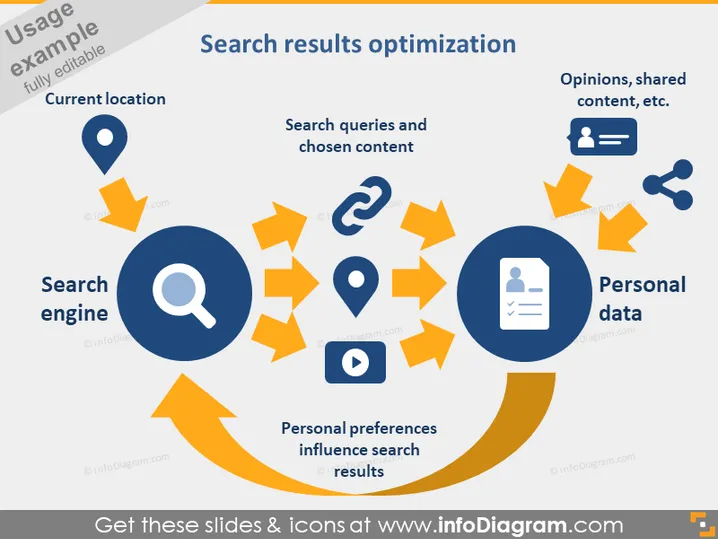
The slide introduces the concept of "Search results optimization" by illustrating how a search engine uses current location and personal data to optimize search queries and chosen content. The slide includes a magnifying glass to represent the search engine. Current location is indicated as a factor in personalizing search results, implying geographical targeting. "Search queries and chosen content" likely refers to the user's input and interaction influencing future search results. Personal data, which includes opinions and shared content, is shown to have a significant impact on the search outcomes.
The slide has a clean, modern look with a well-structured flow that visually leads the viewer through the optimization process. The color contrast between blue and orange ensures important elements are prominent and attention-grabbing.



