

Your graphics add a nice touch to my presentations and I recently used them for one of my all-hands meetings. Your toolbox adds professionalism to my slides. Instead of using standard clipart.
Claude Jones, Director of Engineer, @Walmartlabs, USA

Your graphics add a nice touch to my presentations and I recently used them for one of my all-hands meetings. Your toolbox adds professionalism to my slides. Instead of using standard clipart.
Claude Jones, Director of Engineer, @Walmartlabs, USA
I needed a fresh look at some of my slides. I've tried to find a way to create a paintbrush effect, to underline, accentuate, add some color and the handwritten markers were just the things. Very easy to use, easy to size, change the color. It was an affordable, perfect solution and I'm happy to recommend it.
Anonymous, US
The crisp, clean look of the graphics, and the fact that it allowed me to easily edit and change the colors to match the template was my main reason for purchasing them.
Brandie Jenkins, E-learning Developer, USA
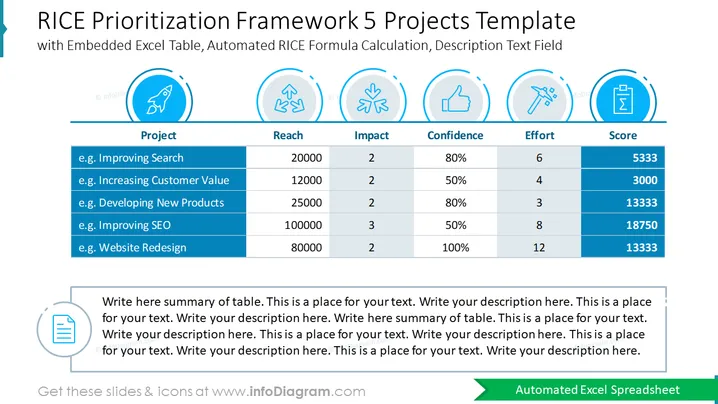
This RICE framework example shows the prioritization of five projects such as improving search, increasing customer value, developing new products, improving SEO, and website redesign. The table has automated RICE formula calculation, where you can explain the reach, impact, confidence, and effort each of the projects have, and their final score. This PowerPoint presentation also has an embedded excel table, which is also compatible with other formats such as Google Slides and Keynote. You can download this template in either, and you won't lose the quality of the graphic elements. The description fields are also customizable, so you can describe whichever project you are currently working on. Use the RICE prioritization framework to present your ideas to your team in an effective and understandable way.
##Slide infographic description:
Excel Table Layout, Color Coding, Flat Outline Icons, Editable Text Block, Colorful Vectors, Line Shape Vector



