
Reviews
Your graphics add a nice touch to my presentations and I recently used them for one of my all-hands meetings. Your toolbox adds professionalism to my slides. Instead of using standard clipart.
I needed a fresh look at some of my slides. I've tried to find a way to create a paintbrush effect, to underline, accentuate, add some color and the handwritten markers were just the things. Very easy to use, easy to size, change the color. It was an affordable, perfect solution and I'm happy to recommend it.
The crisp, clean look of the graphics, and the fact that it allowed me to easily edit and change the colors to match the template was my main reason for purchasing them.
Description
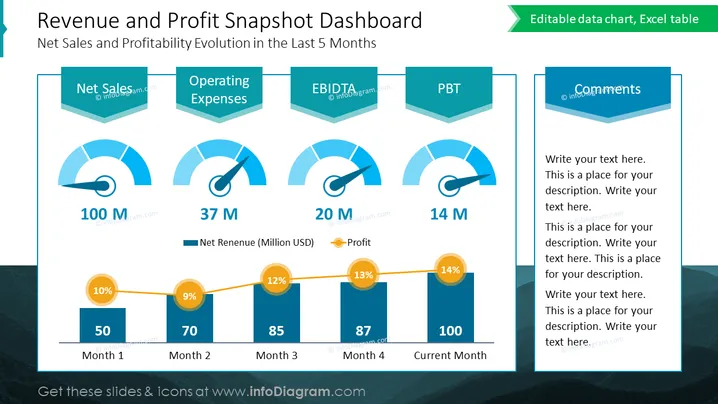
Revenue and Profit Snapshot Dashboard
Slide Content
The slide titled "Revenue and Profit Snapshot Dashboard" presents a visual representation of a company's net sales and profitability evolution over the last 5 months. It comprises four main metrics—Net Sales, Operating Expenses, EBITDA, and PBT—each with a corresponding gauge chart and monetary value (in millions). Below these gauges, there is a bar chart tracking net revenues with overlaying data points showing profit percentages for each month. Additionally, a comments section allows for personalized descriptions or insights related to the data.
Graphical Look
- The slide has a teal and dark blue color scheme with light blue highlights.
- Four gauge charts visualize different financial metrics: Net Sales, Operating Expenses, EBITDA, and PBT (Profit Before Tax) each with a needle indicator and an accompanied monetary value.
- Gauge charts have a three-dimensional banner on top with the name of the metric.
- A horizontal bar chart at the bottom displays net revenue for five months, accompanied by orange circular data points representing profit percentages.
- A lined graph connects the circular data points above the bars, indicating the trend of profits over the months.
- There is a dedicated comments section with space for text, featuring a stylized teal callout box.
- The slide's title is prominently displayed at the top in a large, bold font.
The slide has a professional and clean look with a balance of charts, text areas, and info-graphic elements which facilitate a clear understanding of financial data trends. The use of gauges and a bar chart adds a dynamic and informative element to present complex data in an accessible way.
Use Cases
- Presenting a financial summary in executive meetings or board presentations.
- Analyzing sales and profitability trends during quarterly business reviews.
- Showcasing financial performance to investors or stakeholders.
- Using in financial workshops or seminars to illustrate how to visualize key financial metrics.
How to Edit
How to edit text & colors

How to expand / shorten diagram

How to Replace Icons in infoDiagram PPT


