
Reviews
Ihre Grafiken verleihen meinen Präsentationen eine nette Note, und ich habe sie kürzlich für eines meiner All-Hands-Meetings verwendet. Ihre Toolbox verleiht meinen Folien Professionalität, anstatt Standard-Clipart zu verwenden.
Ich brauchte einen neuen Blick auf einige meiner Folien. Ich habe versucht, einen Weg zu finden, einen Pinselschlag-Effekt zu erzielen, um zu unterstreichen, hervorzuheben, Farbe hinzuzufügen, und die handgeschriebenen Markierungen waren genau das Richtige. Sehr einfach zu bedienen, leicht in der Größe zu ändern, die Farbe zu ändern. Es war eine erschwingliche, perfekte Lösung und ich empfehle sie gerne weiter.
Die klare, saubere Optik der Grafiken und die Tatsache, dass ich die Farben leicht bearbeiten und an die Vorlage anpassen konnte, war mein Hauptgrund für den Kauf.
Description
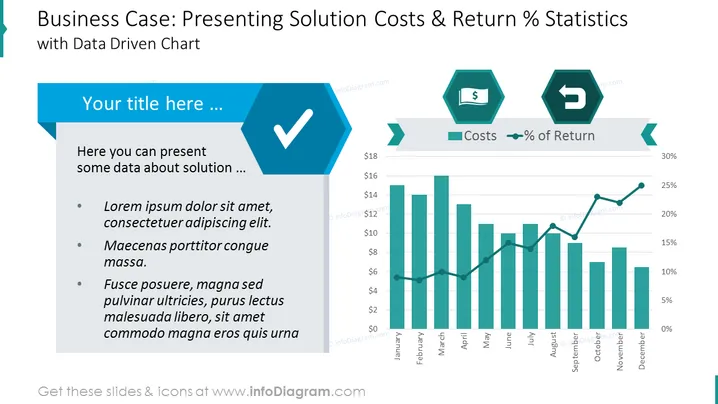
Business Case: Presenting Solution Costs & Return % Statistics
Slide Content:
The PowerPoint slide is tailored for business presentations where the aim is to discuss the financial aspects of a solution, specifically its costs and the percentage of return. It features a section for text where the presenter can elaborate on details about the solution, supported by bullet points for structured information. This is complemented by a data-driven chart that visually contrasts costs against the percentage of return over time, illustrating the economic performance of the solution.
Graphical Look:
- A large blue hexagonal checkmark icon on the left, symbolizing task completion or approval.
- Two smaller hexagonal icons on the right, one with a dollar sign indicating costs and the other with a directional arrow representing return percentage.
- A dual-axis bar and line chart showing monthly costs and return percentage over a year.
The slide has a clean and professional appearance, using a consistent color palette and geometric shapes to create a visually organized and impactful presentation.
Use Cases:
- To present a cost-benefit analysis of a project during a business or stakeholder meeting.
- In financial reports to showcase the profitability and efficiency of a new business solution.
- During budget reviews to compare projected versus actual financial outcomes.
- For investment pitches to highlight the potential returns of a proposed venture.
How to Edit
How to edit text & colors

How to expand / shorten diagram

How to Replace Icons in infoDiagram PPT


