
Reviews
Your graphics add a nice touch to my presentations and I recently used them for one of my all-hands meetings. Your toolbox adds professionalism to my slides. Instead of using standard clipart.
I needed a fresh look at some of my slides. I've tried to find a way to create a paintbrush effect, to underline, accentuate, add some color and the handwritten markers were just the things. Very easy to use, easy to size, change the color. It was an affordable, perfect solution and I'm happy to recommend it.
The crisp, clean look of the graphics, and the fact that it allowed me to easily edit and change the colors to match the template was my main reason for purchasing them.
Description
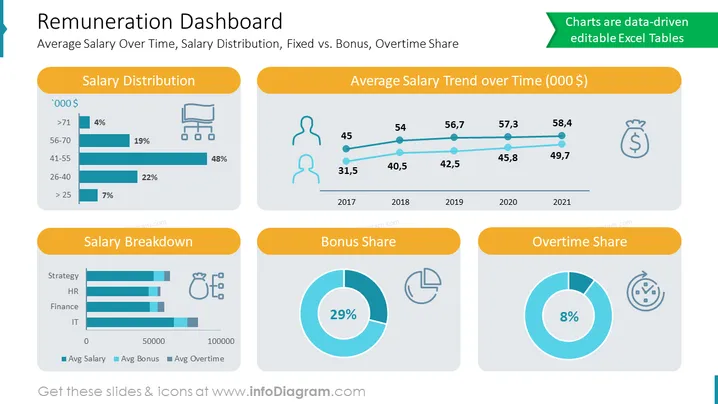
Remuneration Dashboard Template
Slide Content:
- Average Salary Over Time: This metric shows how the average salary of your employees has changed over time. It can be useful for identifying trends and benchmarking your salaries against other companies.
- Salary Distribution: This metric shows how the salaries of your employees are distributed across different salary ranges. It can be useful for identifying any pay gaps or salary disparities.
- Fixed vs. Bonus: This metric shows the breakdown of fixed salary and bonuses for your employees. It can be useful for understanding how much of their compensation is guaranteed and how much is variable.
- Overtime Share: This metric shows the percentage of total compensation that is made up of overtime pay. It can be useful for identifying areas where overtime is being used excessively.
Graphical Look:
The slide has a clean and professional design, with a white background and blue and gray accents. The slide title is displayed in a large, bold font at the top of the slide. The text items are displayed in a smaller, more readable font below the title. The graphical objects on the slide include:
- A line chart showing the average salary over time.
- A bar chart showing the salary distribution.
- A pie chart showing the breakdown of fixed salary and bonuses.
- A gauge chart showing the overtime share. Icons:
You can use the following icons to illustrate these concepts:
- A dollar sign icon to represent salary.
- A clock icon to represent over time.
- A pie chart icon to represent the breakdown of fixed salary and bonuses.
How to Edit
How to edit text & colors

How to expand / shorten diagram

How to Replace Icons in infoDiagram PPT


