
Reviews
Your graphics add a nice touch to my presentations and I recently used them for one of my all-hands meetings. Your toolbox adds professionalism to my slides. Instead of using standard clipart.
I needed a fresh look at some of my slides. I've tried to find a way to create a paintbrush effect, to underline, accentuate, add some color and the handwritten markers were just the things. Very easy to use, easy to size, change the color. It was an affordable, perfect solution and I'm happy to recommend it.
The crisp, clean look of the graphics, and the fact that it allowed me to easily edit and change the colors to match the template was my main reason for purchasing them.
Description
Regression Model Challenges - Underfitting, Overfitting
Slide Content
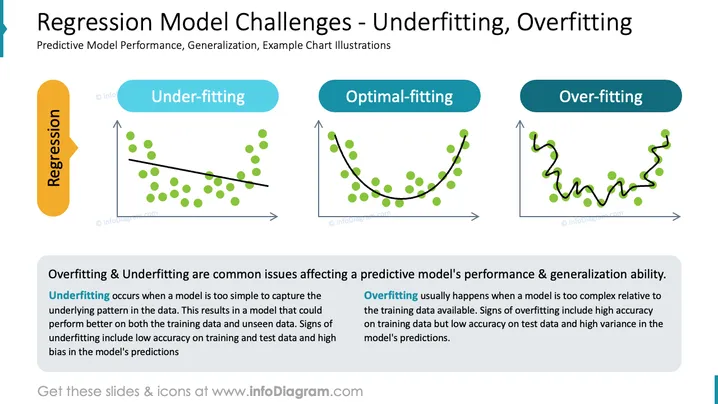
This PowerPoint slide addresses the challenges in regression modeling pertaining to underfitting and overfitting. Underfitting signifies a model's simplicity and its inability to capture the underlying patterns in data, resulting in poor performance and high bias. Optimal-fitting represents a balance where a model accurately captures the true trend. Overfitting highlights the complexity of a model's fit to noise in data, resulting in high accuracy on training data but poor generalization to new, unseen data, demonstrating high variance.
Graphical Look
- The slide has a teal and dark grey color theme.
- There are three graphical charts representing under-fitting, optimal-fitting, and over-fitting.
- Each chart is accompanied by its respective label in a colored oval shape - under-fitting is in light blue, optimal-fitting in medium blue, and over-fitting in dark blue.
- Green dots on the charts signify data points.
- The under-fitting chart shows a straight, black regression line that poorly fits the data.
- The optimal-fitting chart shows a curved, black regression line that follows the data trend closely.
- The over-fitting chart has a black line that zig-zags to fit each data point precisely.
- On the bottom left is a vertical band labeled "Regression" in a golden yellow capsule shape.
- There are text blocks explaining overfitting and underfitting in detail beneath the charts.
The overall look of the slide is clean and professional with a well-organized layout that clearly presents the regression modeling concepts through both visual and textual information.
Use Cases
- Explaining the concept of model fitting to an audience with some statistical or machine learning background.
- Illustrating the trade-off between bias and variance in predictive modeling during a data science training session.
- Demonstrating challenges in predictive modeling to stakeholders during a project update or proposal presentation.
- Using as an educational slide in academic lectures discussing machine learning and regression analysis.
How to Edit
How to edit text & colors

How to expand / shorten diagram

How to Replace Icons in infoDiagram PPT


