
Your graphics add a nice touch to my presentations and I recently used them for one of my all-hands meetings. Your toolbox adds professionalism to my slides. Instead of using standard clipart.
Claude Jones, Director of Engineer, @Walmartlabs, USA
Your graphics add a nice touch to my presentations and I recently used them for one of my all-hands meetings. Your toolbox adds professionalism to my slides. Instead of using standard clipart.
Claude Jones, Director of Engineer, @Walmartlabs, USA
I needed a fresh look at some of my slides. I've tried to find a way to create a paintbrush effect, to underline, accentuate, add some color and the handwritten markers were just the things. Very easy to use, easy to size, change the color. It was an affordable, perfect solution and I'm happy to recommend it.
Anonymous, US
The crisp, clean look of the graphics, and the fact that it allowed me to easily edit and change the colors to match the template was my main reason for purchasing them.
Brandie Jenkins, E-learning Developer, USA
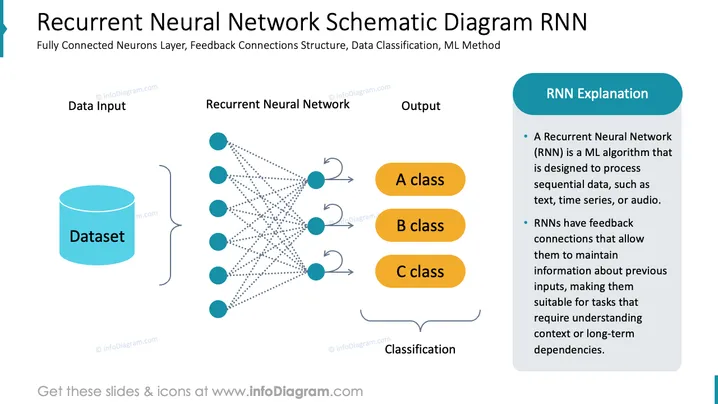
The PowerPoint slide presents the architecture of a Recurrent Neural Network (RNN), which is a machine learning algorithm for processing sequential data such as text, time series, or audio. It illustrates the data flow from input to classification, highlighting the fully connected neuron layers and feedback connections structure essential to RNNs. The diagram breaks down the concept into three main components: data input (Dataset), the Recurrent Neural Network itself, and the output classified into three categories (A class, B class, C class). The slide also includes a brief explanation of RNNs, emphasizing their capability to maintain information through feedback connections which enable the handling of context or long-term dependencies.
The overall look is clean and professional, utilizing shapes and colors consistently to convey the model's structure. The use of icons and simple graphics makes the complex information accessible and engaging to the viewer.




