
Reviews
Deine Folien sind meine 'geheime Zutat', wenn es darum geht, meine Ideen Kunden zu visualisieren. Ich spare so viel Zeit.
Ihre Folien führen oft zu guten Kommentaren und Ideen meines Teams, die die endgültigen Folien verbessern.
Description
Proposed BPA Solution and Technology
Slide Content
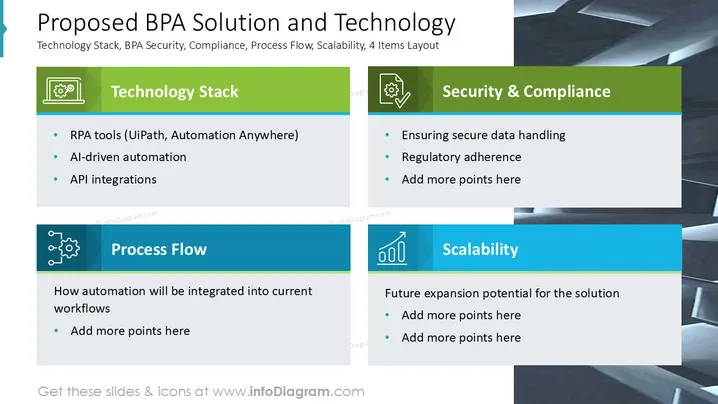
The slide outlines a proposed Business Process Automation (BPA) solution focusing on key areas: Technology Stack, Security & Compliance, Process Flow, and Scalability. The Technology Stack includes RPA tools like UiPath and Automation Anywhere, AI-driven automation, and API integrations to facilitate seamless operations. Security & Compliance ensures secure data handling and regulatory adherence. The Process Flow describes how automation will integrate with current workflows. Scalability addresses future expansion potential of the solution.
Graphical Look
- The slide is divided into four quadrants with distinct color themes: green for Technology Stack and Security & Compliance, blue for Process Flow and Scalability.
- Each section has a unique icon: a gear for Technology Stack, a check mark for Security & Compliance, interconnected nodes for Process Flow, and an upward graph line for Scalability.
- Headers are bold and white, highlighted against colored backgrounds, providing clear differentiation between sections.
- The background features a subtle geometric design adding depth without distracting from the content.
- Text is aligned neatly, with bullet points listing detailed information under each section.
The overall design is clean and professional, using color differentiation and icons for clarity and easy navigation. The slide effectively categorizes complex information into digestible visual chunks.
Use Cases
- Presenting the advantages of adopting BPA solutions to stakeholders.
- Training sessions on integrating RPA tools into existing operations.
- Business meetings discussing IT infrastructure upgrades.
- Strategy development sessions involving regulatory compliance.
How to Edit
How to edit text & colors

How to expand / shorten diagram

How to Replace Icons in infoDiagram PPT


