
Reviews
Ihre Grafiken verleihen meinen Präsentationen eine nette Note, und ich habe sie kürzlich für eines meiner All-Hands-Meetings verwendet. Ihre Toolbox verleiht meinen Folien Professionalität, anstatt Standard-Clipart zu verwenden.
Ich brauchte einen neuen Blick auf einige meiner Folien. Ich habe versucht, einen Weg zu finden, einen Pinselschlag-Effekt zu erzielen, um zu unterstreichen, hervorzuheben, Farbe hinzuzufügen, und die handgeschriebenen Markierungen waren genau das Richtige. Sehr einfach zu bedienen, leicht in der Größe zu ändern, die Farbe zu ändern. Es war eine erschwingliche, perfekte Lösung und ich empfehle sie gerne weiter.
Die klare, saubere Optik der Grafiken und die Tatsache, dass ich die Farben leicht bearbeiten und an die Vorlage anpassen konnte, war mein Hauptgrund für den Kauf.
Description
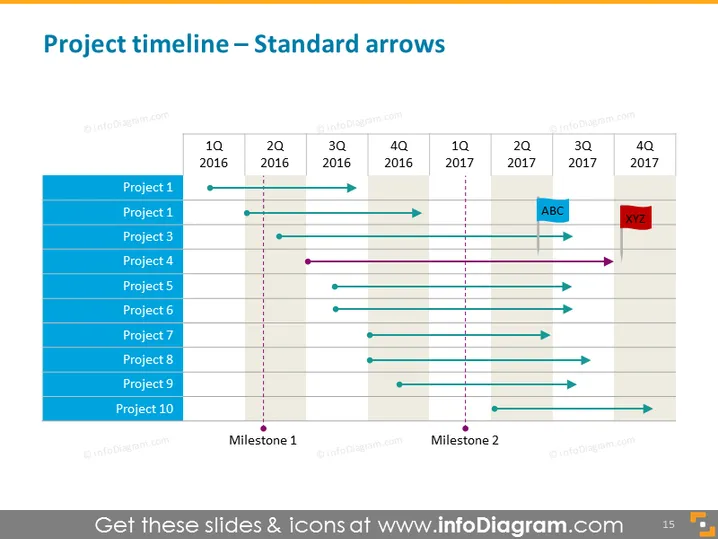
Project timeline – Standard arrows
Slide Content
The PowerPoint slide presents a "Project timeline" using standard arrows to depict the duration and phases of various projects across a two-year span from 2016 to 2017. Each project is listed along the vertical axis, with ten projects shown. The horizontal axis represents time, divided into quarters (Q1 to Q4) for each year. There are markers labeled "Milestone 1" and "Milestone 2," signifying key points or events. Some projects are indicated to start and end within the same year, while others span across the two years, finished with an arrowhead.
Graphical Look
- The title of the slide is in a large, bold, sans-serif font.
- A timeline with a horizontal layout stretches across the slide.
- Vertical text labels on the left side list 'Project 1' to 'Project 10'.
- Time periods are labeled along the top with '1Q 2016' to '4Q 2017'.
- Colored horizontal bars represent the span of each project.
- Teal arrows indicate the ongoing activity in each project.
- Dark purple vertical dashed lines indicate milestones.
- Coloured labels "ABC" and "XYZ" highlight significant project phases or events.
- Timeline intervals and project bars are placed against a light gray background with alternating slightly darker gray for readability.
The slide design is clean and professional, with a straightforward layout that's easy to follow. The use of color effectively distinguishes different elements and draws attention to important points on the timeline.
Use Cases
- To illustrate the timeframes and dependencies in a multi-project environment during a management or team meeting.
- For updating project stakeholders on the progress and outlook of diverse initiatives during a status update or review meeting.
- In project planning sessions to establish the sequence and overlap of tasks and resources across several projects.
- To visually communicate project schedules and critical milestones in business proposals or reports to potential clients or partners.
How to Edit
How to edit text & colors

How to expand / shorten diagram

How to Replace Icons in infoDiagram PPT


