
Your graphics add a nice touch to my presentations and I recently used them for one of my all-hands meetings. Your toolbox adds professionalism to my slides. Instead of using standard clipart.
Claude Jones, Director of Engineer, @Walmartlabs, USA

Your graphics add a nice touch to my presentations and I recently used them for one of my all-hands meetings. Your toolbox adds professionalism to my slides. Instead of using standard clipart.
Claude Jones, Director of Engineer, @Walmartlabs, USA

I needed a fresh look at some of my slides. I've tried to find a way to create a paintbrush effect, to underline, accentuate, add some color and the handwritten markers were just the things. Very easy to use, easy to size, change the color. It was an affordable, perfect solution and I'm happy to recommend it.
Anonymous, US
The crisp, clean look of the graphics, and the fact that it allowed me to easily edit and change the colors to match the template was my main reason for purchasing them.
Brandie Jenkins, E-learning Developer, USA
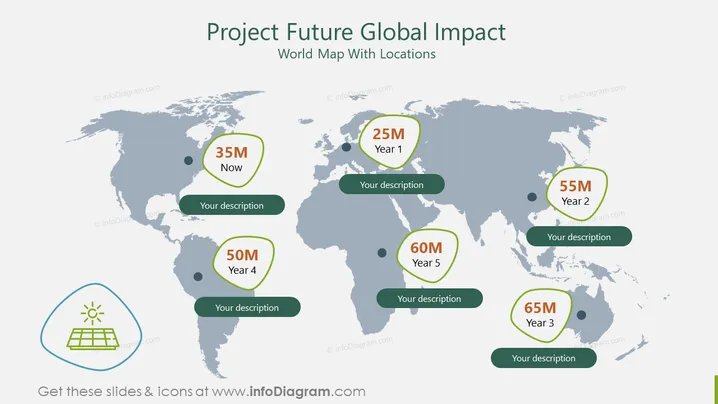
The slide titled "Project Future Global Impact" displays a world map with different locations highlighted and associated with varying figures and years, indicating the expected impact or progress of a project. For example, a figure of "35M Now" might represent current metrics like revenue or users, whereas "25M Year 1" likely projects expected achievements one year into the project. Each figure is accompanied by a placeholder for a description, presumably to elaborate on the data point, such as explaining what the metric represents and the significance of the growth or change over the specified time frame.
The overall look of the slide is modern and professional, with a clear color scheme that emphasizes key data points. The use of the world map suggests a global scale for the project, and the bubble design provides a visual way to attach specific numeric information and descriptions to various geographic locations.


