
Reviews
Ihre Grafiken verleihen meinen Präsentationen eine nette Note, und ich habe sie kürzlich für eines meiner All-Hands-Meetings verwendet. Ihre Toolbox verleiht meinen Folien Professionalität, anstatt Standard-Clipart zu verwenden.
Ich brauchte einen neuen Blick auf einige meiner Folien. Ich habe versucht, einen Weg zu finden, einen Pinselschlag-Effekt zu erzielen, um zu unterstreichen, hervorzuheben, Farbe hinzuzufügen, und die handgeschriebenen Markierungen waren genau das Richtige. Sehr einfach zu bedienen, leicht in der Größe zu ändern, die Farbe zu ändern. Es war eine erschwingliche, perfekte Lösung und ich empfehle sie gerne weiter.
Die klare, saubere Optik der Grafiken und die Tatsache, dass ich die Farben leicht bearbeiten und an die Vorlage anpassen konnte, war mein Hauptgrund für den Kauf.
Description
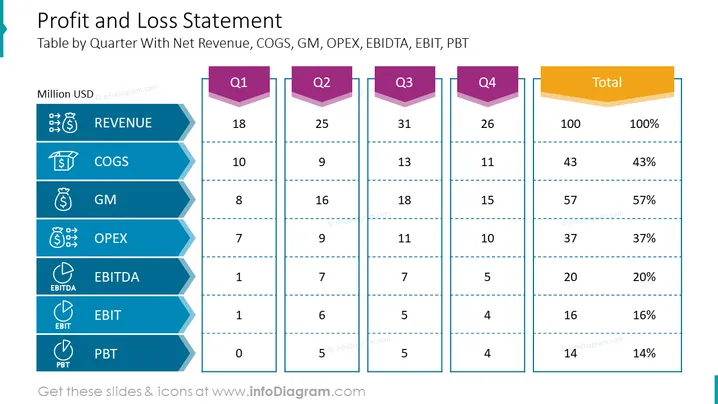
Profit and Loss Statement
Slide Content
The slide presents a detailed Profit and Loss Statement, outlining the financial performance by quarter. It includes key metrics such as Revenue, COGS (Cost of Goods Sold), GM (Gross Margin), OPEX (Operating Expenses), EBITDA (Earnings Before Interest, Taxes, Depreciation, and Amortization), EBIT (Earnings Before Interest and Taxes), and PBT (Profit Before Tax), with corresponding figures given for each quarter (Q1 through Q4) and total values. Each metric is crucial for evaluating a company’s financial health: Revenue indicates the total income, COGS represents the direct costs of producing goods, GM shows profitability after deducting COGS, OPEX signifies the costs of operation, and the various EBITDA, EBIT, and PBT indicators give insights into profit at different stages of accounting.
Graphical Look
- The title is prominently displayed at the top of the slide in dark blue, with a subtitle below in gray.
- Each financial metric is represented as a horizontal blue ribbon with its acronym and a corresponding icon on the left.
- Figures for each quarter are displayed in separate columns, with Q1-Q4 headers depicted as tabs in different shades, and totals in a golden tab on the right.
- A grid layout with dashed horizontal lines separates the metrics for clarity.
- The background of the slide is white which creates a contrast with the blue ribbons and colored tabs.
The slide is clean and corporate, using a limited color palette with blue tones and a contrasting golden color for the total column. Icons associated with each metric aid visual representation.
Use Cases
- Presenting quarterly financial results to stakeholders during business meetings or investor presentations.
- Internal review of financial performance with management or finance teams.
- Training sessions for new employees in the finance department to familiarize them with financial statement structures.
- Creating visual executive summaries for annual or quarterly reports.
How to Edit
How to edit text & colors

How to expand / shorten diagram

How to Replace Icons in infoDiagram PPT


