
Reviews
Sus gráficos añaden un toque agradable a mis presentaciones y recientemente los usé para una de mis reuniones generales. Su conjunto de herramientas añade profesionalismo a mis diapositivas. En lugar de usar imágenes prediseñadas estándar.
Necesitaba un aspecto fresco para algunas de mis diapositivas. Había intentado encontrar una forma de crear un efecto de pincel, de subrayar, acentuar, añadir algo de color y los marcadores escritos a mano fueron justo lo que necesitaba. Muy fácil de usar, fácil de ajustar el tamaño, cambiar el color. Fue una solución asequible y perfecta, y estoy feliz de recomendarla.
El aspecto nítido y limpio de los gráficos, y el hecho de que me permitiera editar y cambiar fácilmente los colores para que coincidieran con la plantilla fue mi principal razón para comprarlos.
Description
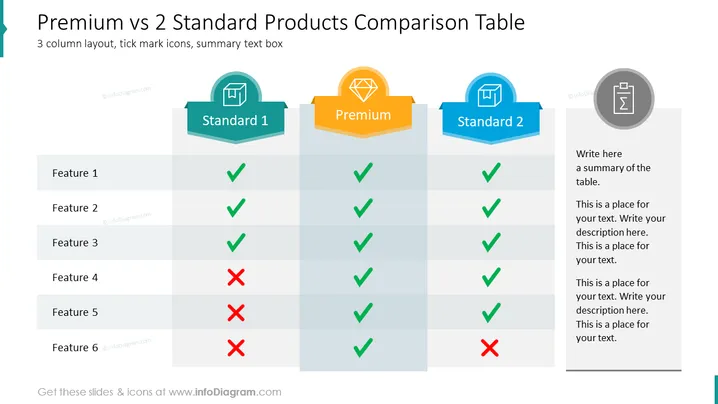
3-Column Product Feature Comparison Slide
This slide shows a 3-column product comparison PowerPoint Template, with the middle column highlighted. You could use this table to compare some product or service features that your company offers, so that the customer can select their preferred option e.g. standard, premium, and basic. Or perhaps you could put this in a presentation on your products or services. You might also adapt this to show what your competitors offer. The template & icons are all fully editable: change the colors to match your brand palette, resize graphic elements without loss of image quality, edit & change text as needed, etc.
Comparison Table Slide contents:
Product Feature Comparison PPT, Vector Graphic Illustrations, Comparison Template Table, 3 Columns, 5 Rows, Feature Icons, Star Icon, Resizable Shapes, White Background
How to Edit
How to edit text & colors

How to expand / shorten diagram

How to Replace Icons in infoDiagram PPT


