
Reviews
Sus gráficos añaden un toque agradable a mis presentaciones y recientemente los usé para una de mis reuniones generales. Su conjunto de herramientas añade profesionalismo a mis diapositivas. En lugar de usar imágenes prediseñadas estándar.
Necesitaba un aspecto fresco para algunas de mis diapositivas. Había intentado encontrar una forma de crear un efecto de pincel, de subrayar, acentuar, añadir algo de color y los marcadores escritos a mano fueron justo lo que necesitaba. Muy fácil de usar, fácil de ajustar el tamaño, cambiar el color. Fue una solución asequible y perfecta, y estoy feliz de recomendarla.
El aspecto nítido y limpio de los gráficos, y el hecho de que me permitiera editar y cambiar fácilmente los colores para que coincidieran con la plantilla fue mi principal razón para comprarlos.
Description
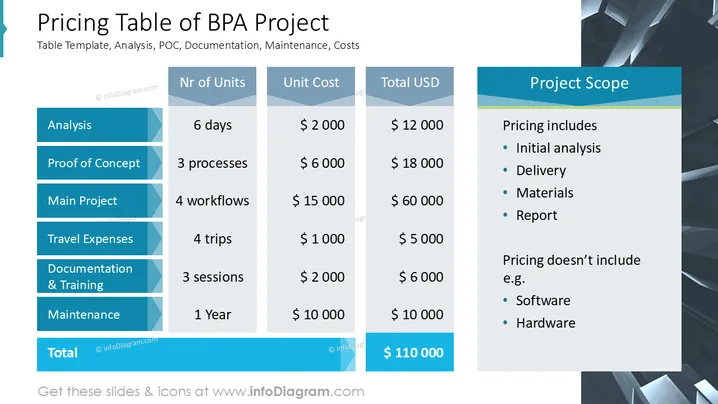
Pricing Table of BPA Project
Slide Content
The slide covers the pricing breakdown of a Business Process Automation (BPA) project. It outlines various components such as "Analysis", lasting 6 days, costing $12,000; "Proof of Concept", involving 3 processes at $18,000; "Main Project", with 4 workflows priced at $60,000; "Travel Expenses" for 4 trips totaling $5,000; "Documentation & Training" for 3 sessions at $6,000; and "Maintenance" over 1 year costing $10,000. The total project cost is $110,000. The project scope includes initial analysis, delivery, materials, and report, while software and hardware are not included.
Graphical Look
- The slide uses a three-column table designed in shades of blue, white, and gray, giving a formal yet approachable appearance.
- The left column outlines project tasks using bold white text inside blue boxes with an angular accent.
- Central and right columns detail "Nr of Units," "Unit Cost," and "Total USD" with a light gray background, adding clarity and contrast.
- A side panel in blue highlights the "Project Scope" with bullet points, enhancing readability.
- The background features abstract, angular shapes in gray scale, adding a modern touch.
The slide has a professional and organized layout, making the detailed pricing information accessible and easy to digest. The use of color differentiation between sections enhances its visual appeal and usability.
Use Cases
- Presenting project budgets to stakeholders or clients.
- Cost breakdowns in proposal or pitch meetings.
- Financial reporting and invoicing for internal project approval.
- Project scope and cost discussions with a potential client.
How to Edit
How to edit text & colors

How to expand / shorten diagram

How to Replace Icons in infoDiagram PPT


