

Your graphics add a nice touch to my presentations and I recently used them for one of my all-hands meetings. Your toolbox adds professionalism to my slides. Instead of using standard clipart.
Claude Jones, Director of Engineer, @Walmartlabs, USA

Your graphics add a nice touch to my presentations and I recently used them for one of my all-hands meetings. Your toolbox adds professionalism to my slides. Instead of using standard clipart.
Claude Jones, Director of Engineer, @Walmartlabs, USA
I needed a fresh look at some of my slides. I've tried to find a way to create a paintbrush effect, to underline, accentuate, add some color and the handwritten markers were just the things. Very easy to use, easy to size, change the color. It was an affordable, perfect solution and I'm happy to recommend it.
Anonymous, US
The crisp, clean look of the graphics, and the fact that it allowed me to easily edit and change the colors to match the template was my main reason for purchasing them.
Brandie Jenkins, E-learning Developer, USA
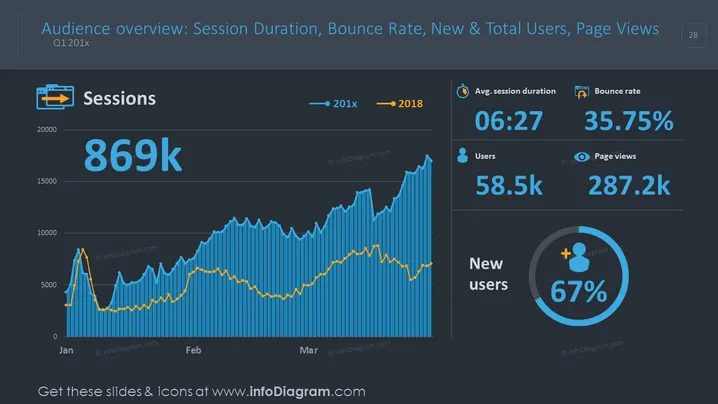
This PowerPoint slide is titled "Audience Overview: Session Duration, Bounce Rate, New & Total Users, Page Views" and displays website analytics data for Q1 20x1. The key metrics presented include "Sessions" at 869k, "Avg. session duration" of 06:27, "Bounce rate" at 35.75%, "Users" totaling 58.5k, "Page views" at 287.2k, and "New users" as a percentage at 67%. The overall purpose of the slide is to provide a snapshot of user engagement and activity on a website or digital platform over a quarterly period, offering insights into the performance of the site.
The slide has a professional and sleek appearance, utilizing a dark color scheme to make the numerical data and charts stand out. The graphics are straightforward, and the use of icons helps to quickly convey the type of data being shown.



