
Reviews
Your graphics add a nice touch to my presentations and I recently used them for one of my all-hands meetings. Your toolbox adds professionalism to my slides. Instead of using standard clipart.
I needed a fresh look at some of my slides. I've tried to find a way to create a paintbrush effect, to underline, accentuate, add some color and the handwritten markers were just the things. Very easy to use, easy to size, change the color. It was an affordable, perfect solution and I'm happy to recommend it.
The crisp, clean look of the graphics, and the fact that it allowed me to easily edit and change the colors to match the template was my main reason for purchasing them.
Description
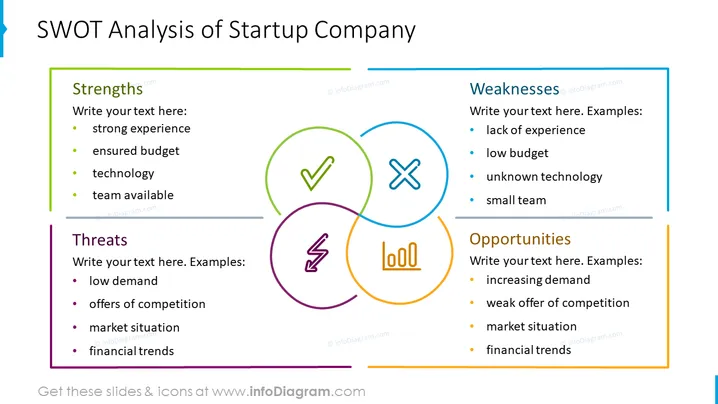
SWOT Analysis of Startup Company
Slide Content
The slide presents a SWOT analysis framework for a startup company. This strategic planning technique is used to identify Strengths, Weaknesses, Opportunities, and Threats related to business competition or project planning. Under "Strengths," examples given include strong experience, ensured budget, technology, and a team available. "Weaknesses" might include a lack of experience, low budget, unknown technology, and a small team. "Threats" are described with low demand, offers of competition, market situation, and financial trends. Lastly, "Opportunities" could be increasing demand, weak offer of competition, market situation, and financial trends. Each item has a placeholder for additional personalized text.
Graphical Look
- The title is at the top of the slide in large, bold font.
- Four colored rectangles, each representing a SWOT category, with respective icons and bulleted example lists.
- The "Strengths" box is green, with a checkmark icon indicating positive aspects.
- The "Weaknesses" box is blue, with an 'X' icon suggesting areas for improvement.
- The "Threats" box is purple, with a lightning bolt icon, symbolizing potential dangers.
- The "Opportunities" box is orange, with graph bars icon indicating growth or potential gains.
- The overall color scheme is bright and clear, with thick, colored lines highlighting each SWOT category.
The slide has a clean and professional design, with a clear distinction between the SWOT elements using color coding and icons. It is visually balanced, with equal spacing and symmetrical arrangement of the four SWOT categories.
Use Cases
- To facilitate a SWOT analysis discussion during a startup pitch or investment meeting.
- In strategic planning sessions to evaluate a startup’s current position and future direction.
- To provide a visual guide for team discussions on improving business strategies.
- In educational settings, to teach students about the components of a SWOT analysis and its application in real-world business scenarios.
How to Edit
How to edit text & colors

How to expand / shorten diagram

How to Replace Icons in infoDiagram PPT


