
Reviews
Ihre Grafiken verleihen meinen Präsentationen eine nette Note, und ich habe sie kürzlich für eines meiner All-Hands-Meetings verwendet. Ihre Toolbox verleiht meinen Folien Professionalität, anstatt Standard-Clipart zu verwenden.
Ich brauchte einen neuen Blick auf einige meiner Folien. Ich habe versucht, einen Weg zu finden, einen Pinselschlag-Effekt zu erzielen, um zu unterstreichen, hervorzuheben, Farbe hinzuzufügen, und die handgeschriebenen Markierungen waren genau das Richtige. Sehr einfach zu bedienen, leicht in der Größe zu ändern, die Farbe zu ändern. Es war eine erschwingliche, perfekte Lösung und ich empfehle sie gerne weiter.
Die klare, saubere Optik der Grafiken und die Tatsache, dass ich die Farben leicht bearbeiten und an die Vorlage anpassen konnte, war mein Hauptgrund für den Kauf.
Description
Company in Numbers – Overview of Key Figures
Slide Content
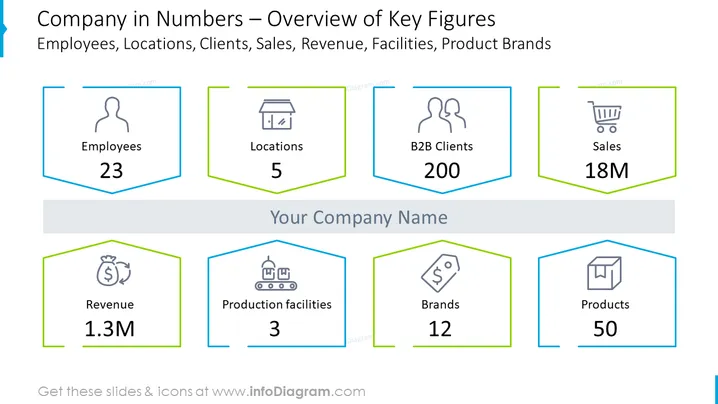
This PowerPoint slide provides an overview of a company's key figures, focusing on quantitative metrics such as the number of employees, locations, B2B clients, sales, revenue, production facilities, brands, and products. The slide presents the figures in a clear and concise manner, with the number of employees (23), locations (5), and B2B clients (200) highlighted to convey the company's human resources, geographic reach, and customer base. The sales figure is listed at 18 million, signifying financial performance. The revenue is stated as 1.3 million, providing a glimpse into the financial health. Production facilities are noted as three, indicating the company's operational capacity, while the number of brands (12) and products (50) reflects the company's offerings.
Graphical Look
- The slide's background is white with six hexagonal icons in two rows, each with a different color outline: blue, yellow, and green.
- Each hexagon contains an icon and label indicative of a business metric, such as an employee silhouette, store facade, multiple users, shopping cart, money bag, factory, brand tag, and product box.
- The metrics are provided in large bold fonts under each icon, with figures like "23", "5", "200", "18M", "1.3M", "3", "12", and "50".
- Above the hexagonal icons is the slide’s title in blue, with a subtitle underneath in gray.
- The title and subtitle are center-aligned and placed on a light blue horizontal banner that spans the slide width.
- Two hexagonal icons appear at the top row and four at the bottom, each separated by a thin line space.
The slide has a clean and professional appearance, with a well-structured layout that effectively draws attention to the key figures. The use of icons alongside the data provides visual cues that help with quick identification of the corresponding metrics.
Use Cases
- For an investor pitch presentation to demonstrate the company's current size and market presence.
- During an internal company meeting to provide employees with a snapshot of the company's operational scale and performance.
- In an annual report presentation to shareholders, highlighting the key metrics and growth over the past year.
- While preparing business proposals or reports, to quickly convey the company's strengths and capabilities to potential partners or stakeholders.
How to Edit
How to edit text & colors

How to expand / shorten diagram

How to Replace Icons in infoDiagram PPT


