
Reviews
Ihre Grafiken verleihen meinen Präsentationen eine nette Note, und ich habe sie kürzlich für eines meiner All-Hands-Meetings verwendet. Ihre Toolbox verleiht meinen Folien Professionalität, anstatt Standard-Clipart zu verwenden.
Ich brauchte einen neuen Blick auf einige meiner Folien. Ich habe versucht, einen Weg zu finden, einen Pinselschlag-Effekt zu erzielen, um zu unterstreichen, hervorzuheben, Farbe hinzuzufügen, und die handgeschriebenen Markierungen waren genau das Richtige. Sehr einfach zu bedienen, leicht in der Größe zu ändern, die Farbe zu ändern. Es war eine erschwingliche, perfekte Lösung und ich empfehle sie gerne weiter.
Die klare, saubere Optik der Grafiken und die Tatsache, dass ich die Farben leicht bearbeiten und an die Vorlage anpassen konnte, war mein Hauptgrund für den Kauf.
Description
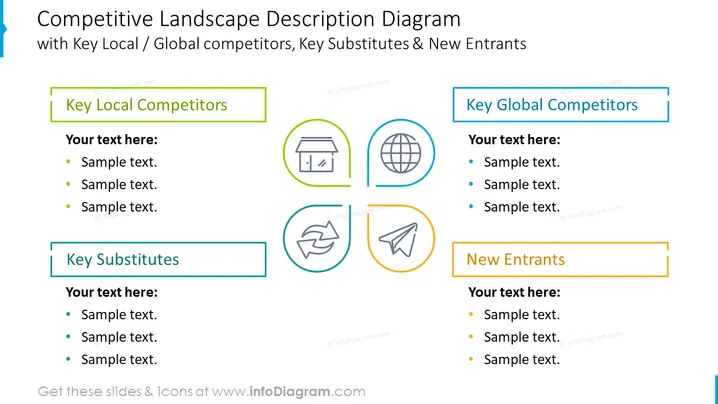
Competitive Landscape Description Diagram
Slide Content
This PowerPoint slide is titled "Competitive Landscape Description Diagram" and discusses the competitive environment of a business. It includes categories like Key Local Competitors, Key Global Competitors, Key Substitutes, and New Entrants. Each category has a text placeholder for descriptions or points. "Key Local Competitors" suggests evaluating closer market rivals; "Key Global Competitors" extends this analysis to an international scale; "Key Substitutes" refers to alternative products/services that could replace the current offering; and "New Entrants" identifies potential fresh competition in the market.
Graphical Look
- The slide background is white, providing a clean contrast for other elements.
- There are four colored boxes, each with a rounded corner, signifying different categories.
- Each category box contains a title and three bullet points with placeholder text indicating where specific information should be entered.
- Connected to each category box is a pair of icons, which are simplified and outlined, corresponding to each category's theme.
- The colors of the boxes and icons are a muted palette, with green for "Key Local Competitors," blue for "Key Global Competitors," teal for "Key Substitutes," and orange for "New Entrants."
- The slide design is symmetrically balanced, with two category boxes on each side.
The overall look of the slide is clean, modern, and designed for easy comprehension. The use of icons and color coding aids in quickly grasping the slide's segmented information.
Use Cases
- To present a business strategy or marketing plan outlining competitive positioning.
- During a SWOT analysis meeting to identify and discuss threats from competitors and substitutes.
- In investor presentations to showcase market understanding and the competitive landscape.
- As a visual aid in internal team meetings to align on the company's strategic responses to market competition.
How to Edit
How to edit text & colors

How to expand / shorten diagram

How to Replace Icons in infoDiagram PPT


