

Your graphics add a nice touch to my presentations and I recently used them for one of my all-hands meetings. Your toolbox adds professionalism to my slides. Instead of using standard clipart.
Claude Jones, Director of Engineer, @Walmartlabs, USA

Your graphics add a nice touch to my presentations and I recently used them for one of my all-hands meetings. Your toolbox adds professionalism to my slides. Instead of using standard clipart.
Claude Jones, Director of Engineer, @Walmartlabs, USA
I needed a fresh look at some of my slides. I've tried to find a way to create a paintbrush effect, to underline, accentuate, add some color and the handwritten markers were just the things. Very easy to use, easy to size, change the color. It was an affordable, perfect solution and I'm happy to recommend it.
Anonymous, US
The crisp, clean look of the graphics, and the fact that it allowed me to easily edit and change the colors to match the template was my main reason for purchasing them.
Brandie Jenkins, E-learning Developer, USA
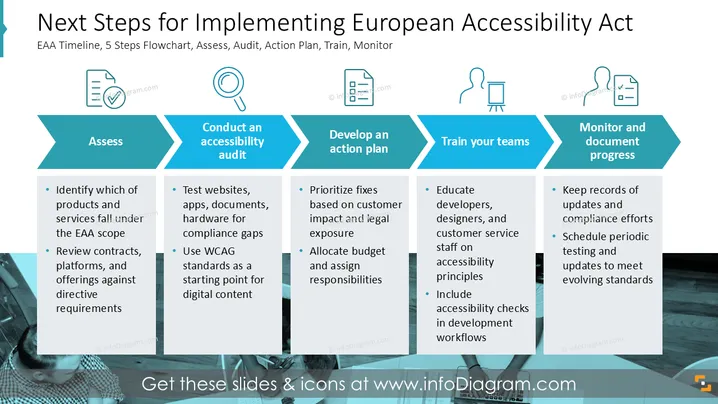
The slide outlines a structured approach for implementing the European Accessibility Act, detailing five steps: Assess, Conduct an accessibility audit, Develop an action plan, Train your teams, and Monitor and document progress. Each step provides actionable items, such as identifying relevant products, testing for compliance gaps, prioritizing fixes, educating staff, and maintaining records. The use of WCAG standards and regular updates ensures that offerings align with accessibility requirements.
The slide's design is clear and concise, utilizing bold colors and structured layouts to effectively convey steps. Icons add a visual cue for each phase, making information digestible.



