
Reviews
Sus gráficos añaden un toque agradable a mis presentaciones y recientemente los usé para una de mis reuniones generales. Su conjunto de herramientas añade profesionalismo a mis diapositivas. En lugar de usar imágenes prediseñadas estándar.
Necesitaba un aspecto fresco para algunas de mis diapositivas. Había intentado encontrar una forma de crear un efecto de pincel, de subrayar, acentuar, añadir algo de color y los marcadores escritos a mano fueron justo lo que necesitaba. Muy fácil de usar, fácil de ajustar el tamaño, cambiar el color. Fue una solución asequible y perfecta, y estoy feliz de recomendarla.
El aspecto nítido y limpio de los gráficos, y el hecho de que me permitiera editar y cambiar fácilmente los colores para que coincidieran con la plantilla fue mi principal razón para comprarlos.
Description
Naive Bayes - Supervised Learning Algorithm
Slide Content
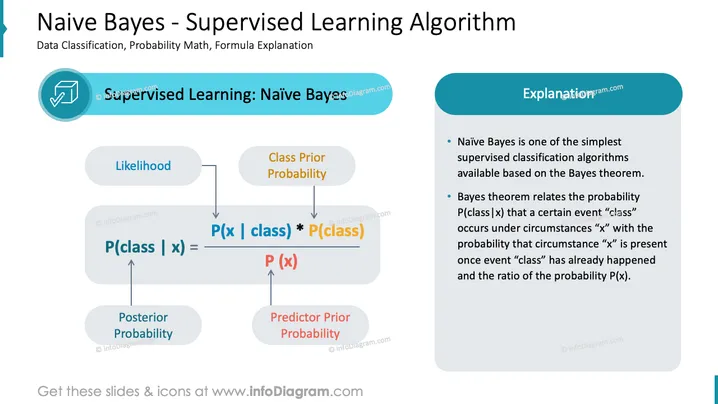
The slide introduces the Naive Bayes algorithm as a simple supervised classification method derived from Bayes theorem. It explains the formula P(class | x) which is the 'Posterior Probability' of a class given a predictor by multiplying the 'Likelihood' of the predictor given the class with the 'Class Prior Probability' and normalizing it by the 'Predictor Prior Probability'. Each term is elaborated: Likelihood signifies how often certain data features are associated with the class; Class Prior Probability indicates the general frequency of the class; and Predictor Prior Probability refers to the frequency of the predictor feature.
Graphical Look
- Slide title is positioned at the top in large blue font
- A subtitle underneath in smaller font provides additional context
- A large rectangular light blue box on the right contains bulleted text explanations
- An arrowed flowchart on the left visually represents the algorithm's formula
- Four connected oval shapes in shades of blue and grey are used to symbolize concepts
- Each concept in the flowchart has an accompanying label in blue font
- Mathematical symbols and formula elements are clearly visible within the flowchart
The slide uses a professional and clean design with a balance of text and visuals. The color scheme is consistent with blue and grey tones, creating a cohesive and informative presentation.
Use Cases
- To educate about Naive Bayes during a machine learning or data science course.
- In a business context, to explain the mathematical basis of a chosen algorithm for data classification.
- For technical presentations to stakeholders to illustrate the mechanisms behind predictive modeling.
- As part of an introductory workshop on statistics and probability in algorithm development.
How to Edit
How to edit text & colors

How to expand / shorten diagram

How to Replace Icons in infoDiagram PPT


