
Reviews
Your slides are my "secret sauce" when it comes to presenting my ideas to clients. I save a lot of time.
J'avais un délai de livraison à respecter et je n'avais pas le temps de créer une variété de modèles de diapositives. Infodiagram m'a proposé des options faciles à télécharger et à personnaliser en fonction de mes besoins !
Vos diapositives suscitent souvent de précieux commentaires et idées de la part de mon équipe, ce qui améliore les diapositives finales.
Description
Modifying Segmentation Deck Shapes in PowerPoint
Slide Content
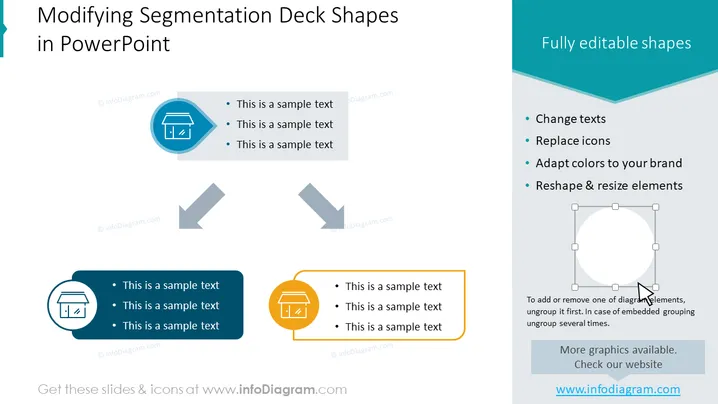
The slide presents the customization options available for segmentation deck shapes in PowerPoint. Users are shown that shapes can have their texts changed, icons replaced, and colors adapted to a specific brand. Each shape can also be reformed through resizing and reshaping. Four items outline these editable features, providing a guide for users to personalize the slide elements to suit their presentations or corporate identity more effectively.
Graphical Look
- The slide background is white with a predominant teal header.
- The header has the slide's title in dark gray, large font.
- Four circular icons with varying background colors (teal, dark blue, and orange) are arranged diagonally from top left to bottom right.
- Each icon is associated with a colored rectangular text box containing three black bullet points of sample text.
- Two gray arrows pointing downwards connect the icons, indicating a flow or sequence.
- On the right side, there is a lighter section delineating four bullet points, each starting with a dark dot.
- A graphic of a white circle with editing handles is shown under the descriptive text on the right, illustrating the idea of resizing and reshaping.
The slide has a clean and professional look, with a good balance between text and graphical elements. It uses simple, colored icons to visually represent the topic of customization in PowerPoint, with a clear and organized layout.
Use Cases
- To instruct how to customize PowerPoint shapes during a presentation design workshop.
- For explaining company branding guidelines when designing internal presentations.
- As a template guide for marketing teams creating client proposals with specific brand requirements.
- During a tutorial for new employees or students to demonstrate the capabilities of PowerPoint in creating tailored presentations.
How to Edit
How to edit text & colors

How to expand / shorten diagram

How to Replace Icons in infoDiagram PPT


