
Reviews
Ihre Grafiken verleihen meinen Präsentationen eine nette Note, und ich habe sie kürzlich für eines meiner All-Hands-Meetings verwendet. Ihre Toolbox verleiht meinen Folien Professionalität, anstatt Standard-Clipart zu verwenden.
Ich brauchte einen neuen Blick auf einige meiner Folien. Ich habe versucht, einen Weg zu finden, einen Pinselschlag-Effekt zu erzielen, um zu unterstreichen, hervorzuheben, Farbe hinzuzufügen, und die handgeschriebenen Markierungen waren genau das Richtige. Sehr einfach zu bedienen, leicht in der Größe zu ändern, die Farbe zu ändern. Es war eine erschwingliche, perfekte Lösung und ich empfehle sie gerne weiter.
Die klare, saubere Optik der Grafiken und die Tatsache, dass ich die Farben leicht bearbeiten und an die Vorlage anpassen konnte, war mein Hauptgrund für den Kauf.
Description
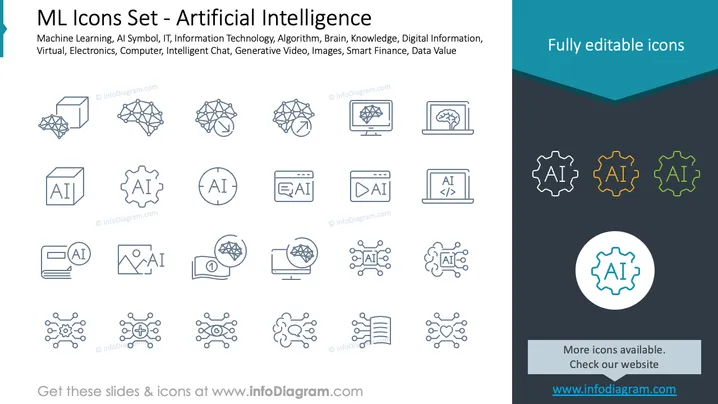
ML Icons Set - Artificial Intelligence
Slide Content
The PowerPoint slide showcases a set of icons related to artificial intelligence and machine learning. The title "ML Icons Set - Artificial Intelligence" suggests the graphics are designed to represent various AI concepts. These icons illustrate themes such as AI Symbol, IT, Information Technology, Algorithm, Brain, Knowledge, Digital Information, Virtual, Electronics, Computer, Intelligent Chat, Generative Video, Images, Smart Finance, and Data Value. Each icon depicts a different aspect of AI, from neural networks and electronic circuits to AI in settings like finance and chatbots.
Graphical Look
- The slide has a clean and modern design with a mainly white background and a dark grey footer.
- Two rows of icons are presented in a grid-like fashion with a caption beneath each icon.
- Icons are uniformly styled with thin lines and simple geometric shapes to represent complex AI concepts.
- On the right, there are four gear-shaped icons colored cyan, yellow, magenta, and green that stand out against the monochromatic palette of the other icons.
- A large gear-shaped icon with the letters "AI" is encircled and centrally placed in a smaller separate compartment as a focal point.
- The slide's title is presented in a bold and large font, while the accompanying text is in a smaller, lighter font.
- A dark blue banner with the text "Fully editable icons" spans the top right section, contrasting with the rest of the slide.
The overall look of the slide is sleek and professional, utilizing a consistent iconography style to convey the theme of artificial intelligence. The minimalistic design ensures focus on the icons themselves and their meanings without visual clutter.
Use Cases
- To introduce various aspects of artificial intelligence in a presentation.
- As visual aids in educational materials about machine learning and related technologies.
- For illustrating services or features in brochures or websites of tech companies specializing in AI.
- In investor pitches to visually communicate different areas of AI development or application that a startup might be working on.
How to Edit
How to edit text & colors

How to expand / shorten diagram

How to Replace Icons in infoDiagram PPT


