
Reviews
Your graphics add a nice touch to my presentations and I recently used them for one of my all-hands meetings. Your toolbox adds professionalism to my slides. Instead of using standard clipart.
I needed a fresh look at some of my slides. I've tried to find a way to create a paintbrush effect, to underline, accentuate, add some color and the handwritten markers were just the things. Very easy to use, easy to size, change the color. It was an affordable, perfect solution and I'm happy to recommend it.
The crisp, clean look of the graphics, and the fact that it allowed me to easily edit and change the colors to match the template was my main reason for purchasing them.
Description
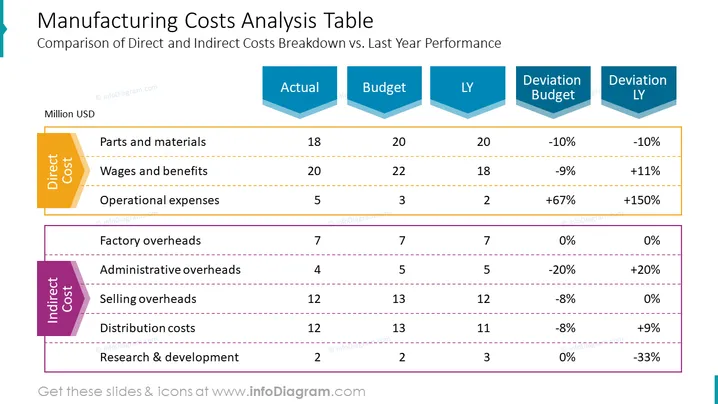
Manufacturing Costs Analysis Table
Slide Content
The slide is dedicated to the comparison of direct and indirect manufacturing costs against the actual, budget, and last year (LY) performance. Direct costs include parts and materials, wages and benefits, and operational expenses, each associated with specific values and their deviations from budget and LY. Indirect costs are comprised of factory, administrative, and selling overheads, along with distribution costs and research & development, also with their corresponding values and deviations. The slide breaks down these costs to showcase where financial variances occur and to what extent relative to the budgeted amounts and previous year's figures.
Graphical Look
- The slide title is at the top in a large, bold font.
- Two main sections divide the slide: one labeled "Direct Cost" highlighted in orange, and one labeled "Indirect Cost" highlighted in purple.
- Each section contains a list of cost elements with horizontal lines separating them.
- A multi-column table presents numerical data with headers "Actual," "Budget," "LY," "Deviation Budget," and "Deviation LY."
- Each header is placed within arrow-shaped, stylized containers colored in shades of blue, with the data below in regular text.
- Percentages indicating deviations from the budget and LY figures are in red or green, showing negative or positive changes.
The slide maintains a clean and structured layout with contrasting colors for differentiation. It uses color-coded sections and clear fonts to present complex financial data in a digestible format.
Use Cases
- Presenting financial results to management or stakeholders to highlight performance against the budget and previous year.
- Using in budget review meetings to identify areas where costs have deviated from expectations significantly.
- Providing a visual aid for financial analysis during internal strategy sessions to inform cost optimizations.
- Illustrating financial data in investor presentations to demonstrate prudent financial management and control.
How to Edit
How to edit text & colors

How to expand / shorten diagram

How to Replace Icons in infoDiagram PPT


