
Reviews
Your graphics add a nice touch to my presentations and I recently used them for one of my all-hands meetings. Your toolbox adds professionalism to my slides. Instead of using standard clipart.
I needed a fresh look at some of my slides. I've tried to find a way to create a paintbrush effect, to underline, accentuate, add some color and the handwritten markers were just the things. Very easy to use, easy to size, change the color. It was an affordable, perfect solution and I'm happy to recommend it.
The crisp, clean look of the graphics, and the fact that it allowed me to easily edit and change the colors to match the template was my main reason for purchasing them.
Description
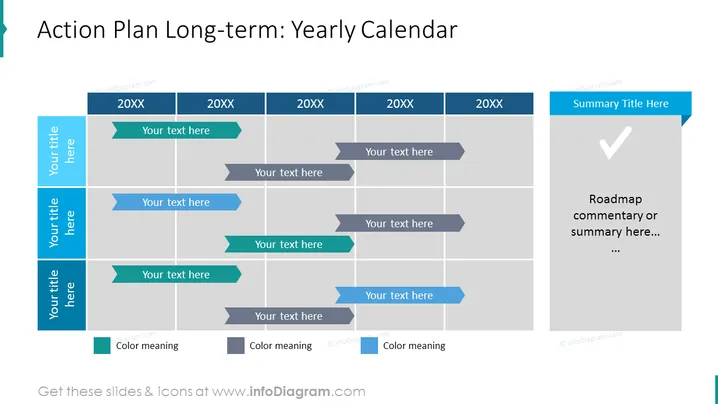
Action Plan Long-term: Yearly Calendar
Slide Content:
The PowerPoint slide provides a template for a long-term action plan set out as a yearly calendar. It is structured to show the progression of activities or tasks across multiple years, labeled as "20XX." Each year has multiple rows with arrow-shaped text boxes pointing right, where specific actions or milestones can be described. The slide includes a sidebar for titles corresponding to each row and a separate section for a summary or commentary on the action plan's overall roadmap.
Graphical Look:
- A grid-like structure representing a timeline across several years labeled "20XX."
- Arrow-shaped text boxes in alternating shades of blue and grey for each event or action.
- A sidebar on the left with additional text boxes in a darker shade of blue for titles.
- A large grey text box on the far right with a checkmark icon for summarizing the action plan.
The design is clean and business-like, with a cohesive color scheme and shapes that guide the viewer through the timeline.
Use Cases:
- For strategic planning meetings to outline long-term goals and initiatives.
- During annual review presentations to summarize past performance and future plans.
- In project management to schedule phases, deliverables, and deadlines over several years.
- For communicating company growth strategies to investors or stakeholders.
How to Edit
How to edit text & colors

How to expand / shorten diagram

How to Replace Icons in infoDiagram PPT


