
Reviews
Your graphics add a nice touch to my presentations and I recently used them for one of my all-hands meetings. Your toolbox adds professionalism to my slides. Instead of using standard clipart.
I needed a fresh look at some of my slides. I've tried to find a way to create a paintbrush effect, to underline, accentuate, add some color and the handwritten markers were just the things. Very easy to use, easy to size, change the color. It was an affordable, perfect solution and I'm happy to recommend it.
The crisp, clean look of the graphics, and the fact that it allowed me to easily edit and change the colors to match the template was my main reason for purchasing them.
Description
Logistic Regression - Supervised Learning Algorithm
Slide Content
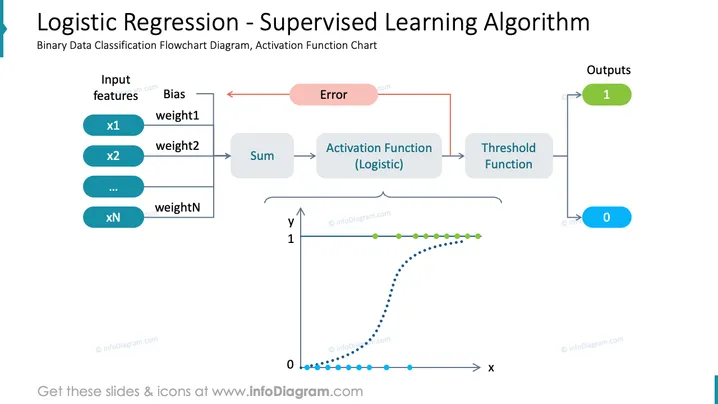
The PowerPoint slide presents the concept of Logistic Regression, which is a Supervised Learning Algorithm used for binary data classification. It displays a flowchart diagram with input features (x1, x2, ..., xN) each multiplied by a corresponding weight and summed, which then passes through a logistic activation function. The output is then decided by a threshold function resulting in binary outputs (0 or 1). An error feedback loop suggests model adjustment based on prediction accuracy.
Graphical Look
- The slide's background is white with a title in teal color at the top.
- Four rows of rounded rectangles in blue shades represent input features on the left side, labeled x1 to xN.
- A grey rectangle labeled "Sum" to which arrows from input features point, indicating a summation process.
- An orange rectangle labeled "Activation Function (Logistic)" follows the sum process.
- A blue rectangle labeled "Threshold Function" is connected to the activation function with an arrow.
- Two output circles to the right of the threshold function, one green with the number 1, and one blue with the number 0.
- A sigmoid curve is graphically depicted below, with a dotted line and green dots indicating the data points.
- Arrows with both red and black colors illustrate the feedback process and connections.
The overall look of the slide is clean and uses color coding to distinguish between different elements of the logistic regression process. The graphical elements like arrows, rectangles, and circles are arranged in a flowchart manner to describe the sequence of events in logistic regression.
Use Cases
- To explain the mechanics of logistic regression in educational presentations or machine learning courses.
- In business meetings to illustrate how binary classification can be applied to real-world data.
- During a technical review or data science project update to convey the model architecture being used.
- For self-study or training materials where visual aids are needed to understand complex algorithms.
How to Edit
How to edit text & colors

How to expand / shorten diagram

How to Replace Icons in infoDiagram PPT


