

Your graphics add a nice touch to my presentations and I recently used them for one of my all-hands meetings. Your toolbox adds professionalism to my slides. Instead of using standard clipart.
Claude Jones, Director of Engineer, @Walmartlabs, USA

Your graphics add a nice touch to my presentations and I recently used them for one of my all-hands meetings. Your toolbox adds professionalism to my slides. Instead of using standard clipart.
Claude Jones, Director of Engineer, @Walmartlabs, USA
I needed a fresh look at some of my slides. I've tried to find a way to create a paintbrush effect, to underline, accentuate, add some color and the handwritten markers were just the things. Very easy to use, easy to size, change the color. It was an affordable, perfect solution and I'm happy to recommend it.
Anonymous, US
The crisp, clean look of the graphics, and the fact that it allowed me to easily edit and change the colors to match the template was my main reason for purchasing them.
Brandie Jenkins, E-learning Developer, USA
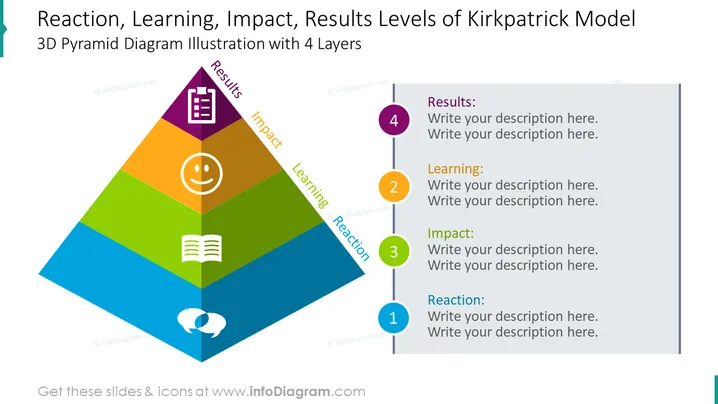
This PowerPoint slide presents a 3D pyramid divided into four layers, each representing a level of the Kirkpatrick Model: Reaction, Learning, Impact, and Results. Each level is paired with an iconic representation: a smiley face for Reaction, showing initial participant satisfaction; an open book for Learning, signifying the acquisition of knowledge or skills; a chat bubble merging two faces for Impact, indicating the application of what was learned; and a clipboard for Results, denoting the achievement of desired outcomes. Placeholder text prompts the presenter to add descriptions for each level.
The slide is visually balanced, with the pyramid drawing immediate focus and the neatly organized text areas promoting clarity. The use of icons and color-coding enhances the viewer's understanding of the hierarchical relationship between the levels.



