

Your graphics add a nice touch to my presentations and I recently used them for one of my all-hands meetings. Your toolbox adds professionalism to my slides. Instead of using standard clipart.
Claude Jones, Director of Engineer, @Walmartlabs, USA

Your graphics add a nice touch to my presentations and I recently used them for one of my all-hands meetings. Your toolbox adds professionalism to my slides. Instead of using standard clipart.
Claude Jones, Director of Engineer, @Walmartlabs, USA
I needed a fresh look at some of my slides. I've tried to find a way to create a paintbrush effect, to underline, accentuate, add some color and the handwritten markers were just the things. Very easy to use, easy to size, change the color. It was an affordable, perfect solution and I'm happy to recommend it.
Anonymous, US
The crisp, clean look of the graphics, and the fact that it allowed me to easily edit and change the colors to match the template was my main reason for purchasing them.
Brandie Jenkins, E-learning Developer, USA
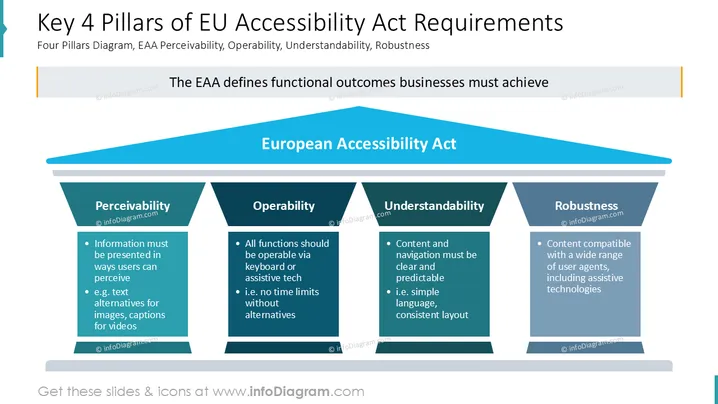
The slide discusses the European Accessibility Act's key requirements, emphasizing the importance of accessibility in business operations. It highlights four essential pillars: Perceivability, meaning information is presented visibly; Operability, where all functions should be usable via alternate means; Understandability, ensuring content and navigation are clear; and Robustness, allowing content compatibility across various platforms. These pillars collectively define the functional outcomes businesses must achieve to align with EAA standards.
The slide features a diagram resembling a classical building, symbolizing structural integrity and support.
The roof of the building is labeled "European Accessibility Act" in bold blue, representing the overarching framework.
Four pillars beneath the roof are labeled: Perceivability, Operability, Understandability, and Robustness, using distinct shades of blue to differentiate them.
Each pillar is divided into a title and description box, emphasizing key aspects of accessibility.
A horizontal banner below the title states, "The EAA defines functional outcomes businesses must achieve."
The slide's clean design with its structured diagram reinforces the concept of solidity and importance, guiding viewers through the essential requirements of the EAA.
Presentations on accessibility compliance for business stakeholders.
Workshops on implementing accessibility guidelines in technology development.
Training sessions for employees on adhering to the EAA regulations.
Informational seminars for corporate policy makers and leaders.



