

Your graphics add a nice touch to my presentations and I recently used them for one of my all-hands meetings. Your toolbox adds professionalism to my slides. Instead of using standard clipart.
Claude Jones, Director of Engineer, @Walmartlabs, USA

Your graphics add a nice touch to my presentations and I recently used them for one of my all-hands meetings. Your toolbox adds professionalism to my slides. Instead of using standard clipart.
Claude Jones, Director of Engineer, @Walmartlabs, USA
I needed a fresh look at some of my slides. I've tried to find a way to create a paintbrush effect, to underline, accentuate, add some color and the handwritten markers were just the things. Very easy to use, easy to size, change the color. It was an affordable, perfect solution and I'm happy to recommend it.
Anonymous, US
The crisp, clean look of the graphics, and the fact that it allowed me to easily edit and change the colors to match the template was my main reason for purchasing them.
Brandie Jenkins, E-learning Developer, USA
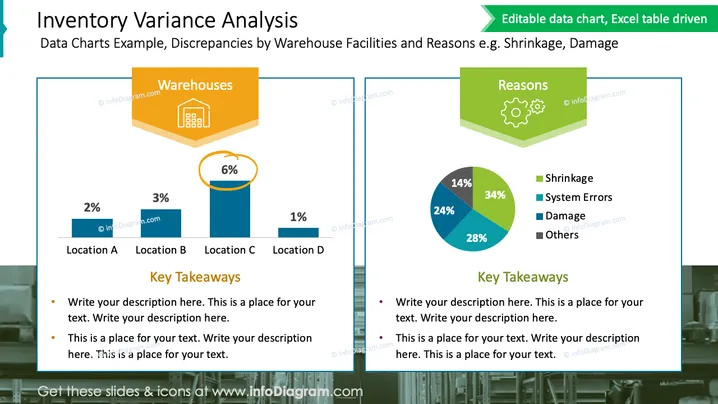
The slide presents an inventory variance analysis focusing on discrepancies at different warehouse facilities and reasons for such discrepancies, such as shrinkage or damage. On the left side, a bar chart displays percentages of variances at four locations, labeled Location A through Location D. The right side shows a pie chart labeling the most common reasons for inventory variance—shrinkage, system errors, damage, and others—each with a corresponding percentage. Below each chart is a section for "Key Takeaways," where specific insights from the data can be elaborated.
The slide is professional in appearance, utilizing a clear and structured layout with color-coded elements for easy comprehension. The use of 3D graphics and subtle background images adds depth to the design.



