
Reviews
Sus gráficos añaden un toque agradable a mis presentaciones y recientemente los usé para una de mis reuniones generales. Su conjunto de herramientas añade profesionalismo a mis diapositivas. En lugar de usar imágenes prediseñadas estándar.
Necesitaba un aspecto fresco para algunas de mis diapositivas. Había intentado encontrar una forma de crear un efecto de pincel, de subrayar, acentuar, añadir algo de color y los marcadores escritos a mano fueron justo lo que necesitaba. Muy fácil de usar, fácil de ajustar el tamaño, cambiar el color. Fue una solución asequible y perfecta, y estoy feliz de recomendarla.
El aspecto nítido y limpio de los gráficos, y el hecho de que me permitiera editar y cambiar fácilmente los colores para que coincidieran con la plantilla fue mi principal razón para comprarlos.
Description
Icons: Production
Slide Content
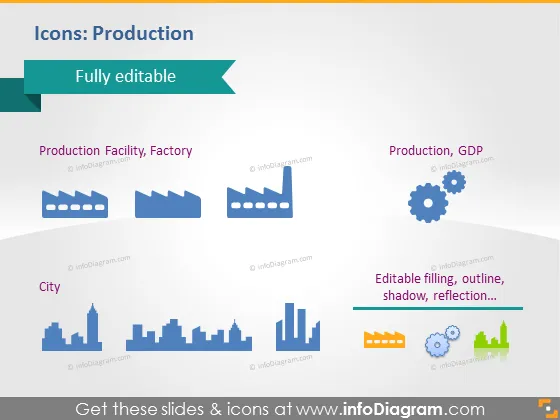
The slide is titled "Icons: Production" and explains that the icons are fully editable. It showcases a collection of graphical icons related to production and industry: "Production Facility, Factory," which implies industrial buildings; "Production, GDP," likely representing economic output; "City," suggesting urban infrastructure. Each icon is paired with text describing what it represents, emphasizing the editability of the icons – you can change the filling, outline, shadow, and reflection.
Graphical Look
- The slide has a light blue background with a darker blue footer.
- A ribbon banner in teal with an arrow points to the text "Fully editable" at the top.
- There are three pairs of icons with labels below them, aligned in a grid format; these icons are stylized and simplified.
- "Production Facility, Factory" icons depict factory buildings.
- "Production, GDP" icons include gear wheels and a rising graph, symbolizing productivity and economic growth.
- The "City" icon consists of bars that could represent a city's skyline or perhaps a bar graph.
- To the right side, there is a text box with a dark blue background and light blue text providing additional information about the editability of the icons (filling, outline, shadow, reflection).
- The mentioned icons and text box feature a shadow effect, adding a sense of depth.
The overall look of the slide is clean and minimalistic, with a consistent color scheme throughout. The use of icons and text is balanced, making the information easily digestible.
Use Cases
- Presenting a manufacturing process overview during a company's operational meeting.
- Illustrating economic sections of a business plan related to industrial growth and city planning.
- Enhancing a report on Gross Domestic Product (GDP) with visual elements for clearer communication.
- Discussing urban development in a presentation to stakeholders or a municipal council.
How to Edit
How to edit text & colors

How to expand / shorten diagram

How to Replace Icons in infoDiagram PPT


